Create and Deserialize a JSON Array
The following example explains how to use activities such as Invoke Code and Deserialize Json Array to create a JSON array, deserialize it, and provide the list of extracted tokens. You can find these activities in the UiPath.WebAPI.Activities package.
This is how the automation process can be built:
-
Open Studio and create a new Process.
-
Drag a Sequence container in the Workflow Designer.
-
Create the following variables:
Variable Name Variable Type Default Value jsonAsStringString jsonAsArrayJArray -
Add an Invoke Code activity inside the Sequence.
-
Select the Edit Code button and add the following code in the opened window:
Dim obj As ArrayList = New ArrayList()
obj.Add("Starcraft")
obj.Add("DOTA 2")
obj.Add("FarCry")
Out = JsonConvert.SerializeObject(obj) -
Once the code is added, select the OK button.
-
Select the Edit Arguments button and add the following argument:
Argument Direction Type Value outOut String jsonAsString -
Once finished, select the OK button like in the following GIF:

-
-
Add a Log Message activity after the Invoke Code activity.
- Add the expression
"JSON As String: "+jsonAsStringin the Message field.
- Add the expression
-
Add a Deserialize Json Array activity after the Log Message activity.
- Add the variable
jsonAsStringin the Json String field. - In the Properties panel, add the variable
jsonAsArrayin the JsonArray field.
- Add the variable
-
Add a For Each activity after the Deserialize Json Array activity.
- Add the value
tokenin the ForEach field. - Add the variable
jsonAsArrayin the VB expression field. - In the Properties panel, in the TypeArgument field, make sure you chose JValue.
- Add the value
-
Add a Log Message activity inside the Body of the For Each activity.
- Add the expression
token.ToStringin the Message field.
This is how the workflow should look:
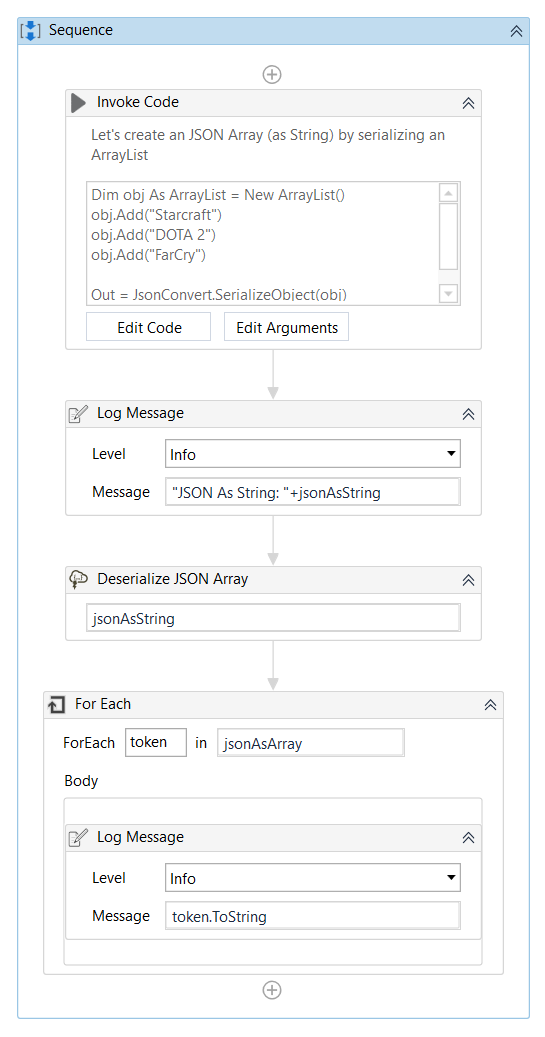
- Add the expression
-
Run the process. A JSON array is created, deserialized as a String and provided as a list of extracted tokens.
Here you can download an example.