Generative activities - Good practices
This page provides good practices for using the Extract Document Data and Classify Document activities using a Generative Predefined project, as well as the Data Extraction Scope and the Classify Document Scope activities with Data Extraction and Generative Classifier activities respectively.
Timeouts
It is strongly recommended to leave the timeout at its default value of 1 hour. If you want to change it, we recommend not lowering it below 10 minutes.
If you set a lower timeout value, you may encounter errors. For example:
[...] A task was canceled [...]for Data Extraction Scope with Generative Extractor or Classify Document Scope with Generative Classifier activities.[...] The processing took too long and the timeout value configured on the activity has been reached [...]for Extract Document Data, Classify Document activities.
Rate limiting handling
You may encounter an error such as:
[...] Rate limit exceeded. Please try again later. Error code: [GptRateLimitError] [...].
Possible cause
Document Understanding Generative Services are currently under high load in your region. Please retry your request after a short while.
Possible solution
A recommended approach is to implement a retry mechanism for such errors, allowing the workflow to automatically attempt the operation again after a short delay (we recommend at least 1 minute) instead of failing immediately.
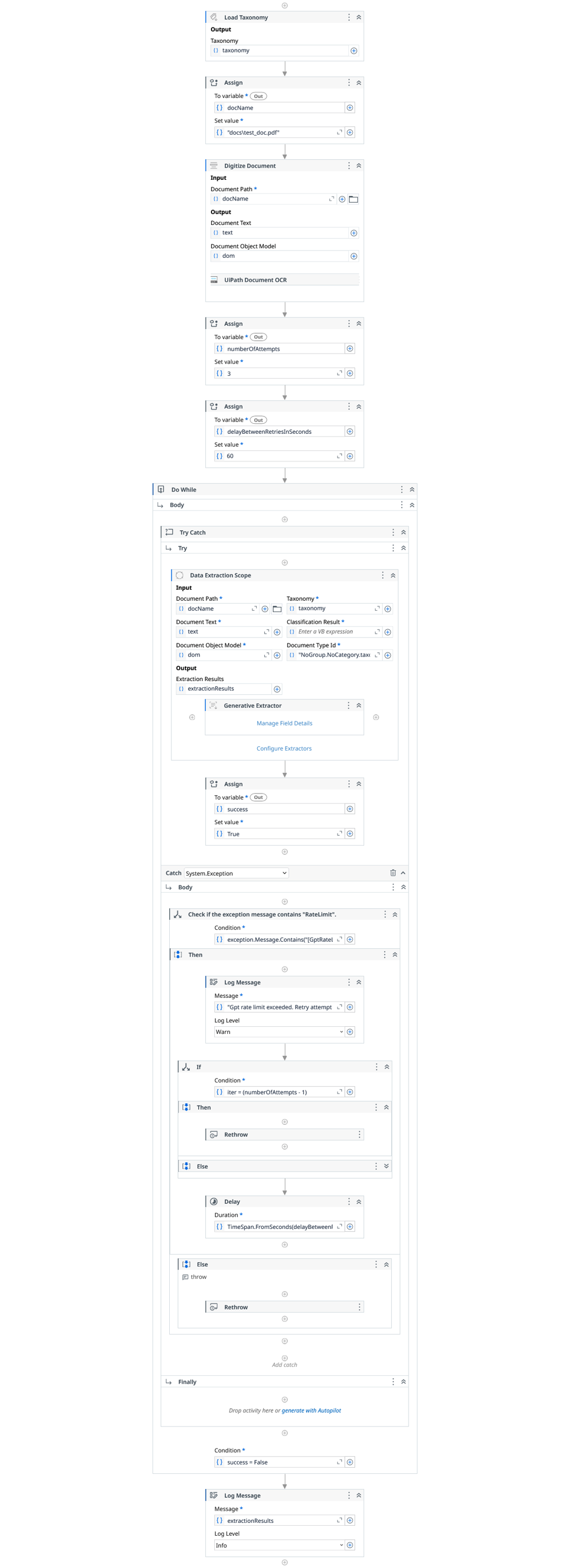
At a high level, the workflows follow the retry logic outlined in the following code block:
+--------------------------------------------------+
| Initialize retry parameters                      |
|                                                  |
| numberOfAttempts = 3                             |
| delayBetweenRetriesInSeconds = 60                |
+--------------------------------------------------+
                    |
                    v
+--------------------------------------------------+
| Do While (success == false)                      |
+--------------------------------------------------+
                    |
                    v
        +-----------------------------+
        | Try                         |
        |-----------------------------|
        | Run Generative              |
        | Classify / Extract Activity |
        |                             |
        | success = true              |
        +-----------------------------+
                    |
        +-----------------------------+
        | Catch Exception             |
        |-----------------------------|
        | If exception contains       |
        | "[GptRateLimitError]"       |
        |                             |
        |   If attempt < max retries  |
        |      Delay                  |
        |   Else                      |
        |      Rethrow exception      |
        |                             |
        | Else                        |
        |   Rethrow exception         |
        +-----------------------------+
                    |
                    v
            (Exit Do While)
The following workflows demonstrate how to handle this scenario effectively.
Workflow: Using Extract Document Data
This section shows an example workflow for using the Extract Document Data activity.

Workflow: Using Classify Document
This section shows an example workflow for using the Classify Document activity.

Workflow: Using Data Extraction Scope with Generative Extractor
This section shows an example workflow for using the Data Extraction Scope activity with Generative Extractor.
Workflow: Using Classify Document Scope with Generative Classifier
This section shows an example workflow for using the Classify Document Scope activity with Generative Classifier.
