Identify Face
UiPath.AmazonRekognition.Activities.AddFace
The Identify Face activity uses the Amazon Rekognition SearchFacesByImage API to first detect the largest face in your input image (ImagePath or ImageURL), then search the specified collection (Collection) for matching faces. The activity compares the features of the input face with the faces in the collection and outputs an array of faces (Faces) that match your input image.
Summary
Dependencies
| Dependency | Details |
|---|---|
| Packages | UiPath.Amazon.Rekognition.Activities |
| Activities | Amazon Scope Create Collection (unless a collection already exists) Add Face (unless the collection already contains the faces you want to identify) |
Attributes
| Attribute |
Details |
|---|---|
| Input Datatypes (Variables) |
Applies to property: ImagePath , ImageURL , and CollectionName |
| Output Datatypes (Variables) |
|
| API used |
Amazon Rekognition - SearchFacesByImage |
| Examples |
Properties
The values for the following properties are specified when adding this activity to your project in UiPath Studio.
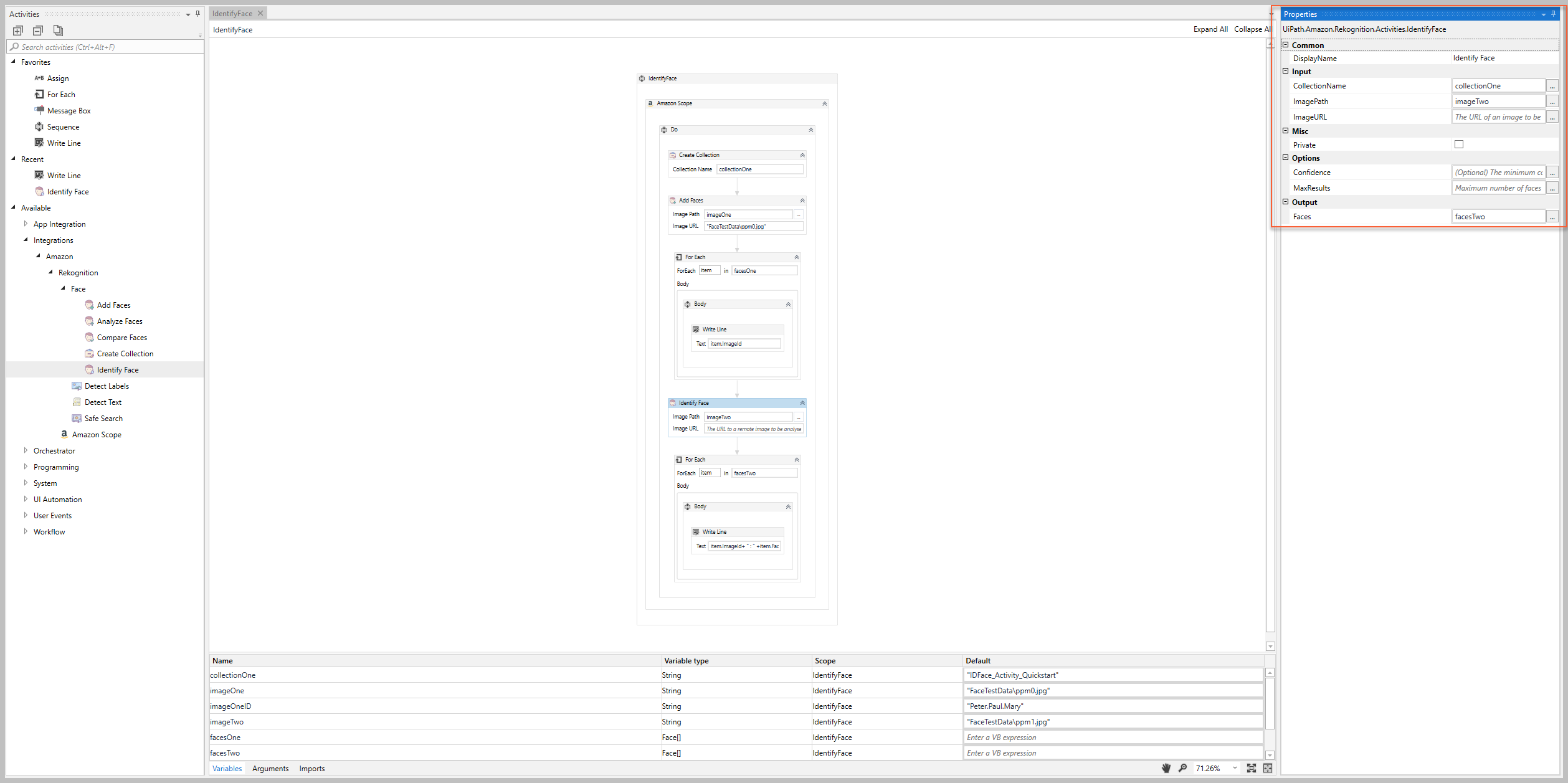
Common
DisplayName
The display name of the activity.
| Attributes | Details |
|---|---|
| Type | String |
| Required | Yes |
| Default value | Identify Face |
| Allowed values | Enter a String or String variable. |
| Notes | N/A |
Input
CollectionName
The name or ID of an existing collection that you want to use to identify detected faces.
| Attributes |
Details |
|---|---|
| Type |
|
| Required |
Yes |
| Default value |
Empty |
| Allowed values |
Enter a String or String variable. |
| Notes |
|
ImagePath
The path to a local image that you want to analyze.
| Attributes |
Details |
|---|---|
| Type |
|
| Required |
Yes (if the ImageURL is empty) |
| Default value |
Empty |
| Allowed values |
Enter a String or String variable. |
| Notes |
|
ImageURL
The URL of an image that you want to analyze.
| Attributes |
Details |
|---|---|
| Type |
|
| Required |
Yes (if the ImagePath is empty) |
| Default value |
Empty |
| Allowed values |
Enter a String or String variable. |
| Notes |
|
Misc
Private
If selected, the values of variables and arguments are no longer logged at Verbose level.
| Attributes | Details |
|---|---|
| Type | Checkbox |
| Required | No |
| Default value | Not Selected |
| Allowed values | Selected or Not Selected |
| Notes | N/A |
Options
Confidence
The minimum confidence value (i.e., percentage of similarity) to consider the faces to be a match.
| Attributes |
Details |
|---|---|
| Type |
|
| Required |
No |
| Default value |
0.70 (not displayed in the property) |
| Allowed values |
Enter a number between 0 and 1 to indicate the percentage of similarity (e.g., enter .8 if you want the similarity to be 80%). |
| Notes |
|
MaxResults
The maximum number of faces that you want the activity to return in the response.
| Attributes | Details |
|---|---|
| Type | Int32 |
| Required | No |
| Default value | Empty |
| Allowed values | Enter a Int32 or Int32 variable. |
| Notes | N/A |
Output
Faces
An array of faces that match the face specified in the input image.
| Attributes |
Details |
|---|---|
| Type |
UiPath.Amazon.Rekognition.Models.Face[] |
| Required |
No (recommended if you plan to use the output data in subsequent activities) |
| Default value |
Empty |
| Allowed values |
Enter your value as a Face[] variable. |
| Notes |
|