Transliterate
UiPath.MicrosoftTranslator.Activities.TransliterateActivity
The Transliterate activity uses the Microsoft Translator API to transliterate the provided text.
How It Works
The following steps are an example of how the activity works from design time (i.e., the activity dependencies and input/output properties) to run time.
- Complete the Setup steps.
- Add the Microsoft Translator Scope activity to your project.
- Add the Transliterate activity inside the Microsoft Translator Scope activity.
- Create and enter
Stringsor aStringvariables for the Intput properties. - Create and enter a
Stringvariable for the Output property.
Properties
Common
- DisplayName - The display name of the activity. This field supports only
StringsorStringvariables.
Input
- From Script - The script from which to transliterate. This field supports only
StringsorStringvariables. The script needs to be specified as an ISO 15924 script ID. - Language - The language in which the text is written specified as a BCP 47 language tag. This field supports only
StringsorStringvariables. For a complete list of the supported llanguages, please visit the official Microsoft Documentation. - Text - The text to be transliterated. This field supports only
StringsorStringvariables. - To Script - The script into which to transliterate. This field supports only
StringsorStringvariables. The script needs to be specified as an ISO 15924 script ID.
Misc
- Private - If selected, the values of variables and arguments are no longer logged at Verbose level.
Output
- Transliteration Result - The result of the transliteration process. This field supports only
Stringvariables.
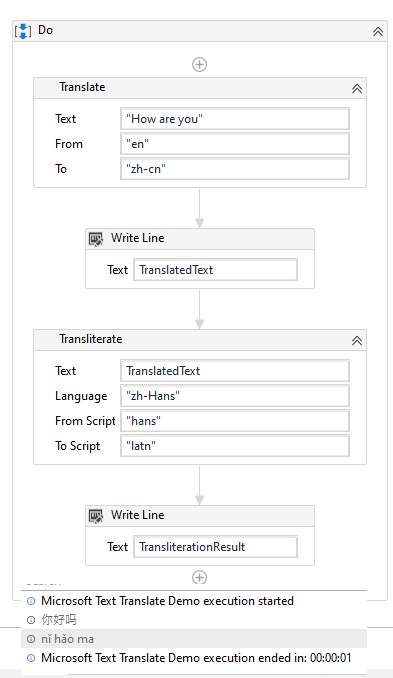
Example
The values that are needed for Translate and Transliterate can be confusing for first time users. Below is a working sample activity flow and the resulting output.