Get Process Instances
UiPath.Oracle.IntegrationCloud.Process.Activities.GetProcessInstancesActivity
The Get Process Instances activity uses the Oracle Integration Retrieve Process Instance List API to retrieve all processes that match your specified filter parameters (Assignment Filter, Created After, Priority, Process Name, Updated After).
After completing the get operation, the activity outputs the applicable processes in a DataTable object (Processes) along with the API call status (Status) and response message (Response Message).
How it works
The following steps and message sequence diagram is an example of how the activity works from design time (i.e., the activity dependencies and input/output properties) to run time.
- Complete the Setup steps.
- Add the Oracle Process Scope activity to your project.
- Add the Get Process Instances activity inside the Oracle Process Scope activity.
- Enter values for the Filters input properties.
- Create and enter a
DataTablevariable andStringvariables for the Output properties. - Run the activity.
-
Your input properties are sent to the Retrieve Process Instance List API.
-
The API returns the
DataTableandStringvalues to your output property variables.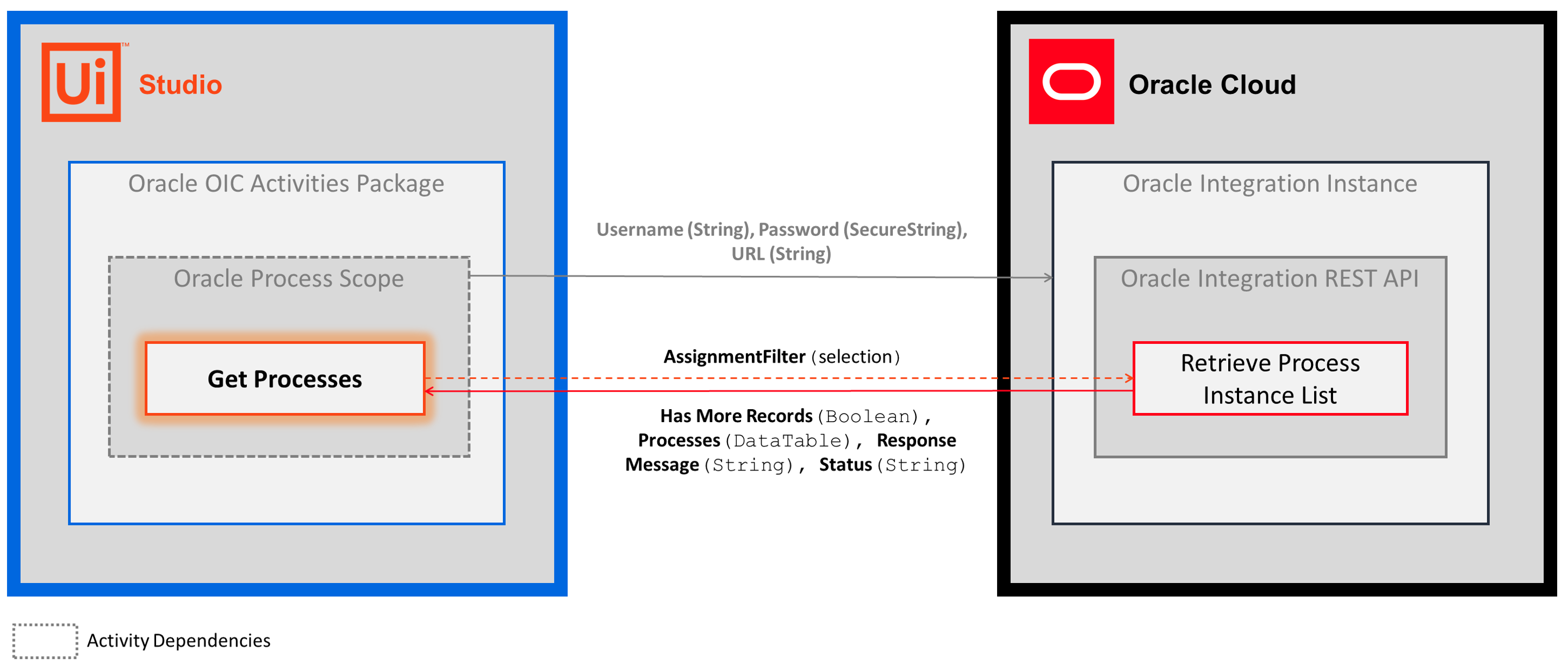
-
Properties
Common
- DisplayName - The display name of the activity. This field supports only
StringsorStringvariables.
Filters
- Assignment Filter - Filters the processes according to the user or group assignments. Select an item from the drop-down list. There are 5 options:
- My_And_Group - Displays process instances that are assigned to anyone, including you, in the groups you belong to.
- Owner - Displays process instances that you're the owner of.
- Reviewer - Displays process instances that you're a reviewer of.
- Admin - Displays all process instances for Admin users.
- All - No filtering for admin context user; displays all process instances that are created by you for non-admin.
- Created After - Returns the process instances created after the specified date. Enter a
DateTimeorDateTimevariable. - Priority - The priority of the processes that you want to retrieve. Enter a
Int32orInt32variable. Enter a value from 1 (highest) to 5 (lowest). - Process Name - The name of the process instance that you want to return. This field supports only
StringsorStringvariables. - Updated After - Returns the process instances updated after the specified date. Enter a
DateTimeorDateTimevariable.
Misc
- Private - If selected, the values of variables and arguments are no longer logged at Verbose level.
Pagination
- Limit - The maximum amount of process instances that you want to retrieve. Enter a
Int32orInt 32variable. If you want to get a specific process, but don't have the Process Id for the activity, you can set this value to 1 and enter the Process Name to further limit the results that are returned in theDataTableobject.- To extract the Process Id from the
DataTableand convert it to a variable for use in other activities, see the notes for the property below.
- To extract the Process Id from the
- Offset - Offset value of the response. Enter a
Int32orInt32variable.
Output
- Has More Records - A boolean value that informs you when there are more records than the amount specified in the Limit property. This field supports only
Booleanvariables. - Process Instances - The process instances that match your filter property values. Enter a
DataTablevariable.- The
DataTableincludes a ProcessId column that contains theInt32value you can use as an input variable in subsequent activities (e.g., Get Process Attachments, Add Process Comment). - For example, to create a
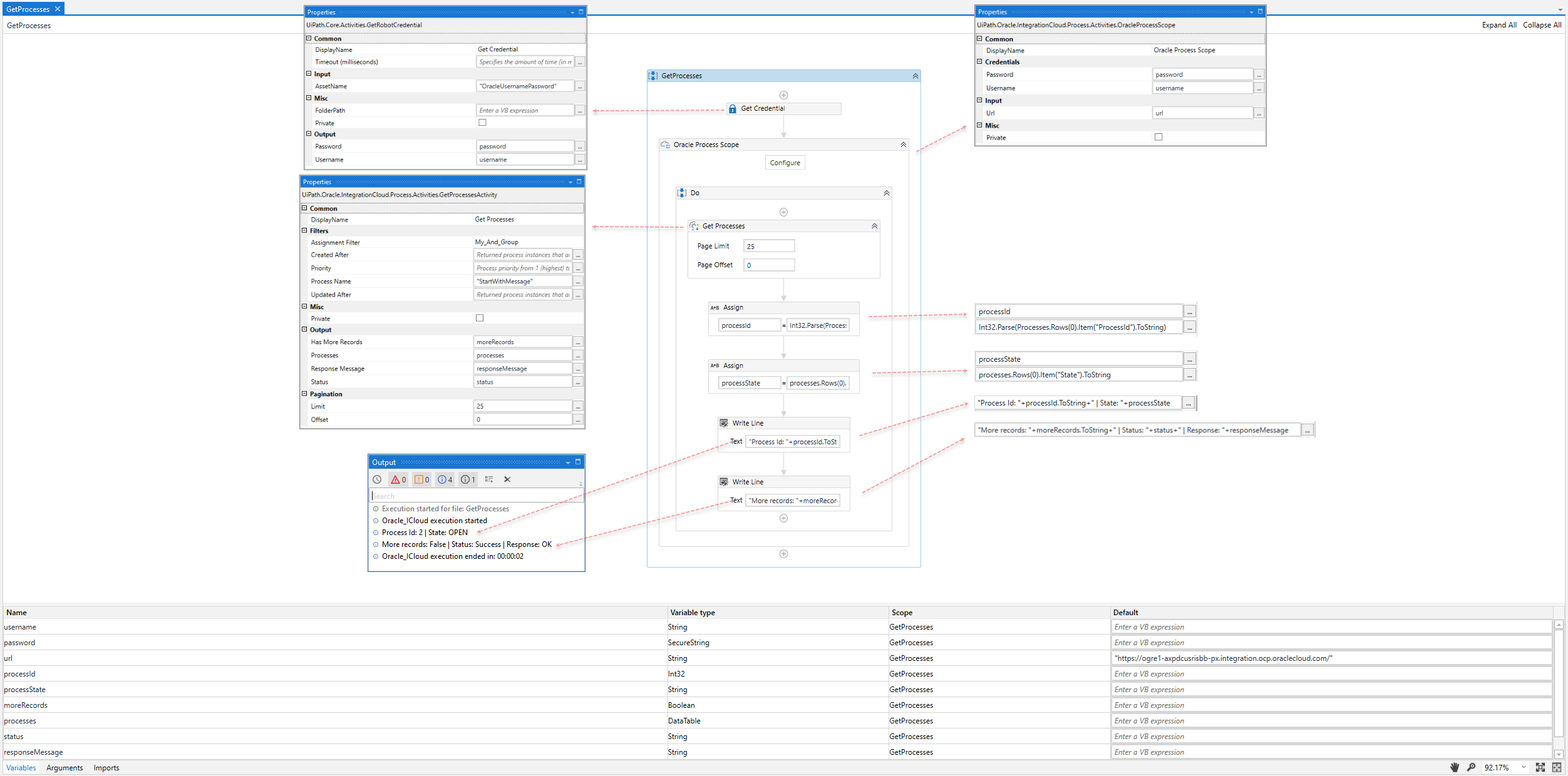
Int32variable for the Process Id, you can use an Assign activity with the following Value: Int32.Parse(processes.Rows(0).Item("ProcessId").ToString) (were "processes" is theDataTablevariable that you create for this property - see the example below).
- The
- Response Message - The API response message. This field supports only
Stringvariables. - Status - The status of the request. Enter a
Stringvariable. Possible values are Success or Failure.
Example
The following image shows an example of the activity dependency relationship and input/output property values.