Insert Record
UiPath.OracleNetSuite.Activities.InsertRecord
The Insert Record activity uses the the SOAP add operation to insert a new record object.
After inserting the record, the activity outputs the status of the request (success/failure information) in a Status object (NetSuiteStatus) that you can use in subsequent activities (e.g., conditional logic).
This activity also returns the internalid value of the new record object. For example, if you want to insert a NetSuite Employee object, you can output the internalId value by adding a String variable in the object wizard (see example below).
How it works
The following steps and message sequence diagram is an example of how the activity works from design time (i.e., the activity dependencies and input/output properties) to run time.
- Complete the Setup steps.
- Add the Oracle NetSuite Application Scope activity to your project.
- Add the Insert Record activity inside the Oracle NetSuite Application Scope activity.
- Click the Configure button inside the Insert Record activity (this opens the Object Wizard).
- Select the Object you want to insert and add the fields (with values) you want to populate.
- Create and enter a
ResponseStatusvariable for the Output property.-
Your input property values are sent to the add operation.
-
The operation returns the
ResponseStatusvalue to your output property variable.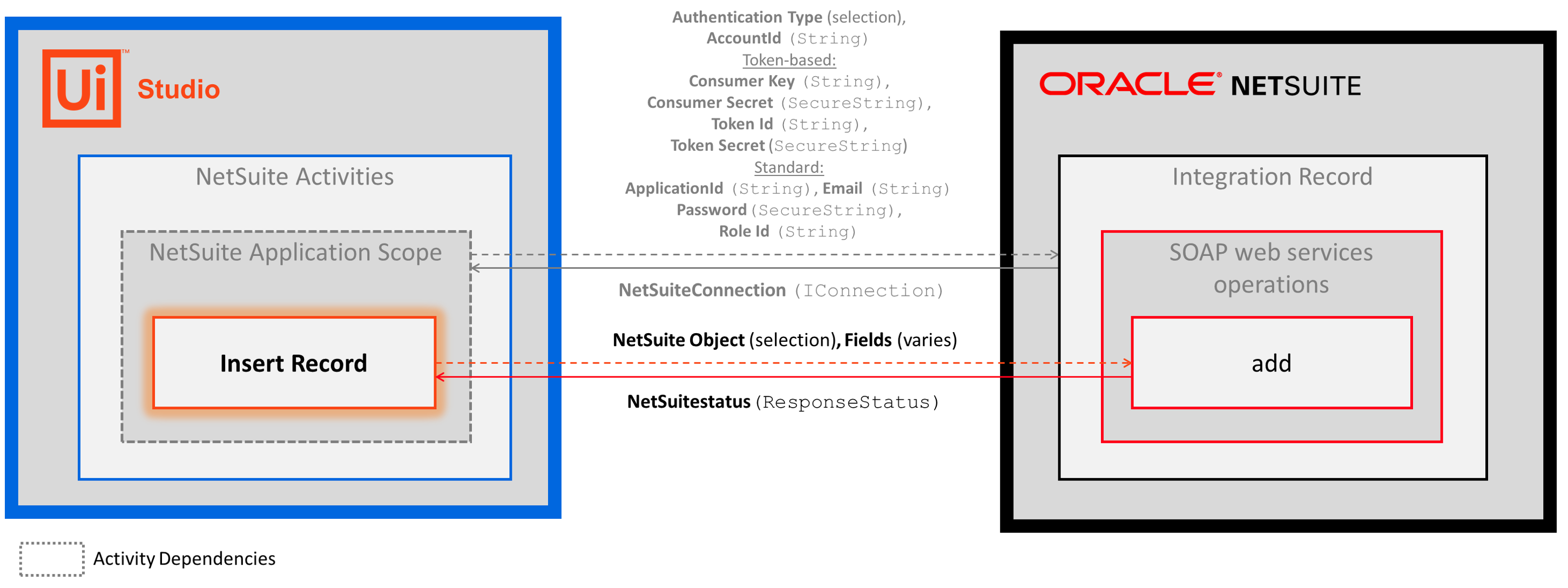
-
In the Body of the Activity
To enter your Insert NetSuite Record property values, you must use the Object Wizard by clicking the Configure button.
To learn more, see the Wizards section in the About page.
- Select Object - The type of object that you want to insert. Select an item from the drop-down list.
- Internalid - The id of the NetSuite record that gets created. This field supports only
Stringvariables.- The internalid is auto-generated by NetSuite when you insert your new record. To retrieve this value for use in other activities, create and enter a
Stringvariable in the object wizard (example shown below). - For more information, see Enable Show Internal IDs in the Setup guide.
- The internalid is auto-generated by NetSuite when you insert your new record. To retrieve this value for use in other activities, create and enter a
Properties
Common
- DisplayName - The display name of the activity. This field supports only
StringsorStringvariables.
Misc
- Private - If selected, the values of variables and arguments are no longer logged at Verbose level.
Options
- Record - A record with additional set of fields that will be set during the operation. The record must be the same type as the selected object in the Configure wizard. If a field is configured in the Configure wizard, that value will override the value in the record.
Output
- ResponseStatus - The status of the request (success/failure information). Enter a
ResponseStatusvariable (UiPath.BAF.Models.ResponseStatus). TheResponseStatusobject includes three properties that you can use in other activities.- Success -
Boolean- Specifies whether the API request was successful. - ErrorCode -
String- The response error if the API request is unsuccessful (Success=False). - Message -
String- The error message.
- Success -