Upload File
UiPath.OracleNetSuite.Activities.UploadFile
The Upload File activity uses the the Oracle NetSuite file.create API to upload a file (FilePath) to a specific folder (FolderId).
After uploading the file, the activity outputs the file id of the file (FileId) and the status of the upload (success/failure information) in a ResponseStatus object (ResponseStatus). Both of these outputs can be used as input variables in subsequent activities (e.g., FileId in Download File and ResponseStatus in conditional logic).
The maximum file upload size is 10MB per Oracle NetSuite documentation.
How it works
The following steps and message sequence diagram is an example of how the activity works from design time (i.e., the activity dependencies and input/output properties) to run time.
-
Complete the Setup steps.
-
Add the Oracle NetSuite Application Scope activity to your project.
-
Add the Upload File activity inside the Oracle NetSuite Application Scope activity.
-
Create and enter a
Stringand aFolderIdvariable for the Input properties. -
Create and enter a
Stringand aFilevariable for the Input properties. -
Create and enter a
Stringand aFileIdvariable for the Output properties. -
Create and enter a
Stringand aResponseStatusvariable for the Output properties.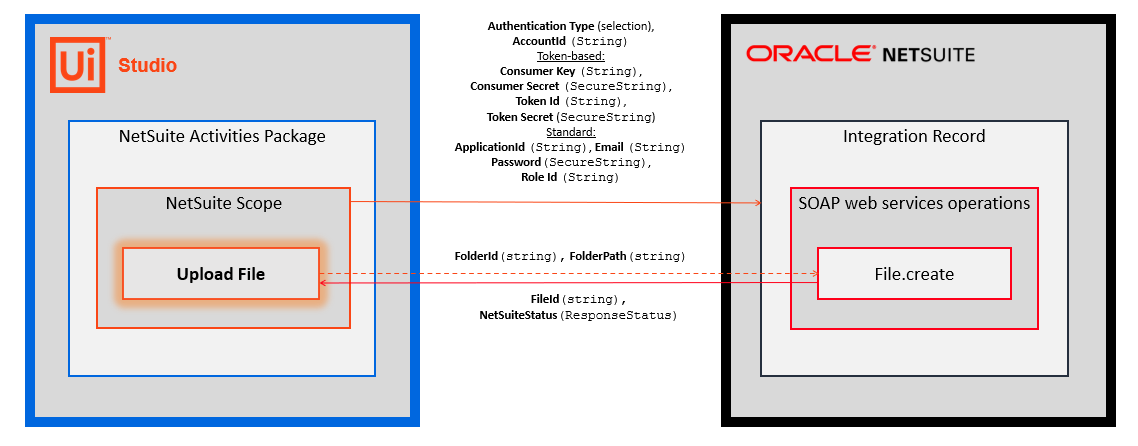
Properties
Common
- DisplayName - The display name of the activity. This field supports only
StringsorStringvariables.
Input
- File - The complete local path to the file that you want to upload. This field supports only
StringsorStringvariables. - FolderId - The Id of the folder to upload your file to. This field supports only
StringsorStringvariables.
Misc
- Private - If selected, the values of variables and arguments are no longer logged at Verbose level.
Output
- FileId - The id of the file. This field supports only
Stringvariables. The variable you create for this property can be used as an input variable in subsequent activities (e.g., Download File, etc.). - ResponseStatus - The status of the request (success/failure information). Enter a
ResponseStatusvariable (UiPath.BAF.Models.ResponseStatus). TheResponseStatusobject includes three properties that you can use in other activities.- Success -
Boolean- Specifies whether the API request was successful. - ErrorCode -
String- The response error if the API request is unsuccessful (Success=False). - Message -
String- The error message.
- Success -