Cell in Sheet Updated
UiPath.GSuite.Activities.Sheets.Triggers.SheetCellUpdated
Description
Starts the automation when a cell within a sheet is updated.
Scopes
This activity requires the following scopes:
OR
OR
OR
Project compatibility
Windows | Cross-platform
Configuration
-
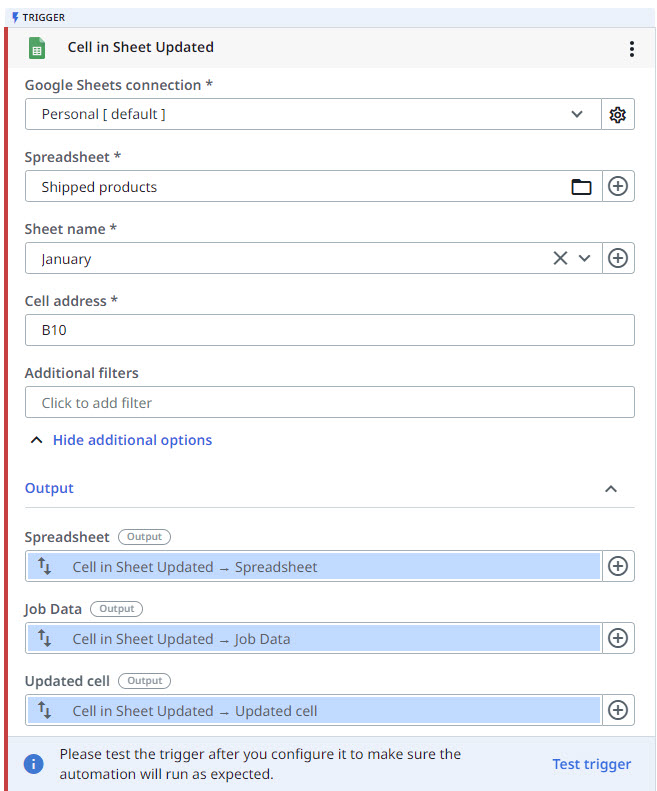
Google Sheets connection - The connection for the Google Workspace account to use in the activity.
-
Spreadsheet - The Google spreadsheet to use. Click the Folder
 icon to browse Google Drive folders and select a spreadsheet.
- Select the Reload Browser option if you've modified your folders and need to retrieve the latest data.
-
Sheet name - The sheet to be monitored.
- Select the Update Sheets option if you've modified your sheets and need to retrieve the latest data.
-
Cell address - The cell address in the sheet to monitor, e.g.,
A2,B10. This field supportsStringvariables and string formatted input. -
Additional filters - Configure additional criteria to check on the updated cell.
Output
- Spreadsheet - The Google spreadsheet file, saved as a
GDriveRemoteItemvariable. Automatically generated output variable. You can use it as it is or save it with a different name. - Job Data - Contains job info, such as Process name, Process version, Workflow name, Robot name, and mode of execution.
- Cell - Information about the updated cell. Automatically generated output variable. You can use it as it is or save it with a different name. You can use this in other activities.
Example
See also: