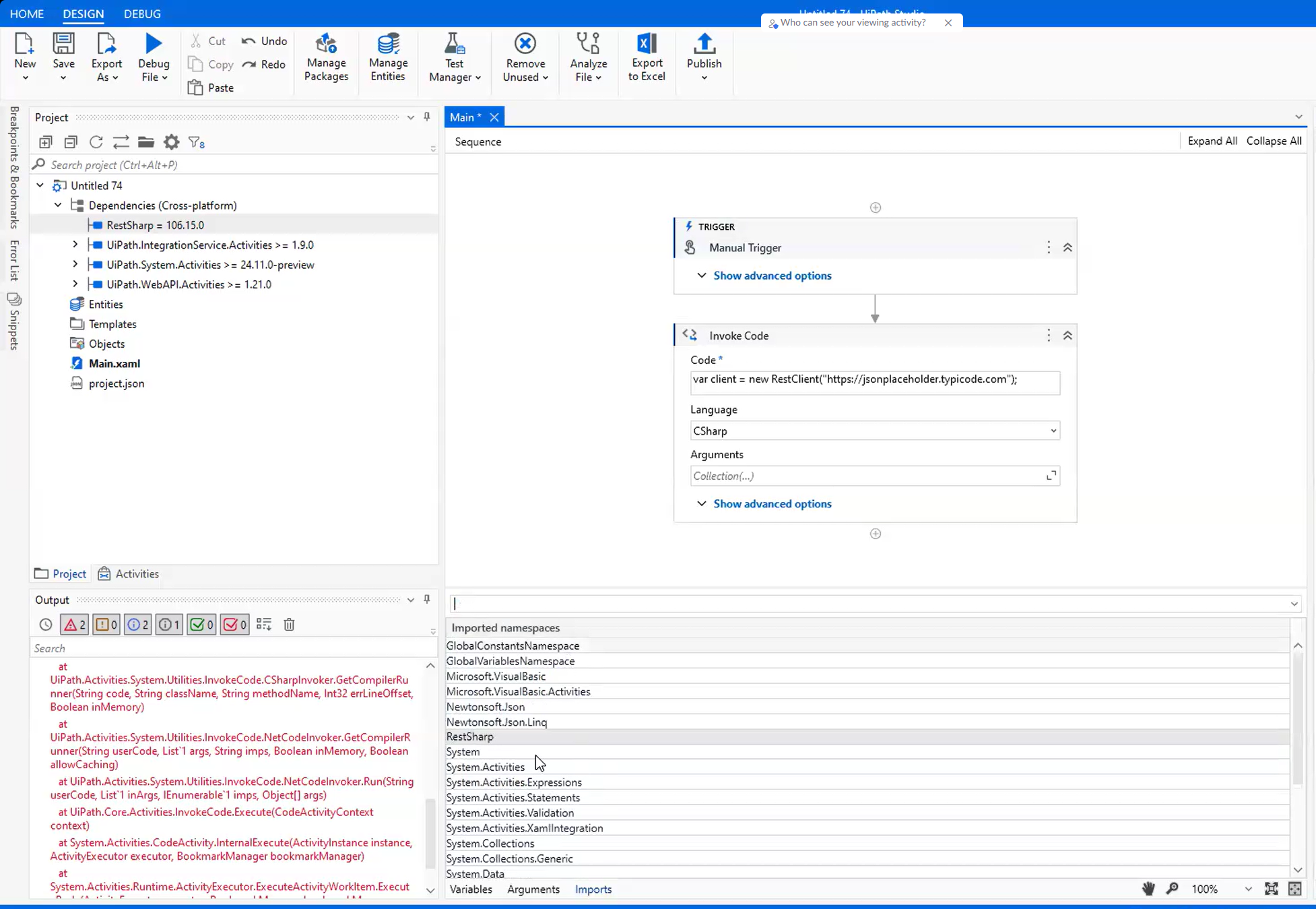
Example: Using the RestSharp library in the Invoke Code activity
Say you need to execute the following C# code snippet with the Invoke Code activity:
var client=new RestClient("https://jsonplaceholder.typicode.com");
Where RestClient is a class in the RestSharp namespace.
For the previous snippet to execute successfully, you need to install the RestSharp library and import the RestSharp namespace in your project.
- If your project is in Studio Web, follow the steps from Importing new libraries in Studio Web.
- If your project is in Studio Desktop, follow the steps from Importing new libraries in Studio Desktop.
-
Select the Azure feed, then search for the RestSharp library and install it. The RestSharp library should be displayed in the Dependencies tree of the Project panel.
noteIf the Official feed does not display your library, you need to add the feed where the library may be hosted.
-
In the Main window, switch to the Imports tab at the lower-left part.
-
Search for the generic
RestSharpnamespace. Select it to add it to the namespaces list. -
Execute the activity.