Replacing a queue
Apps Studio allows replacing the queue referenced in the app. This capability is helpful when you move your apps between organizations or environments (Development, Test, and Production).
To replace a queue with another one:
-
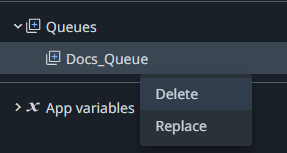
In the tree view, right-click on the queue you want to replace, and then select Replace. When you change the tenant, previously referenced queues become unavailable and they are marked as errors.

-
The queue replacement wizard opens. To select a queue from a different tenant, click pick a different tenant.
-
In the left-hand panel, select the desired queue by checking the box next to the queue name. The list of the selected queue properties is displayed in the right-hand panel.
-
Click Replace.
importantYou cannot undo the replacement of a queue.
Replacing a queue where a field is removed may lead to invalid bindings in the app.