Generate coded automations
Autopilot assists you in generating coded automations, either from text and existent code, or from manual test cases created in Test Manager.
Generating coded automations from text and existent code
In a new or existent coded automation, you can use Autopilot to generate code from natural language, from comments in your automation, or from existent lines of code. Use the Ctrl + Shift + G shortcut, or the Autopilot icon, to generate code.
Generating coded automations from manual tests
After you connect Studio Desktop to Test Manager, navigate to the Test Explorer and search for your manual tests. From here, you can choose one of the following scenarios to generate a coded test case for it:
-
Create a coded test case, where the steps are shown as comments, using Create Coded Test Case.. Then prompt Autopilot to generate code based on the comments.
-
Directly generate a fully functional coded test case using Generate Coded Test Case with Autopilot.
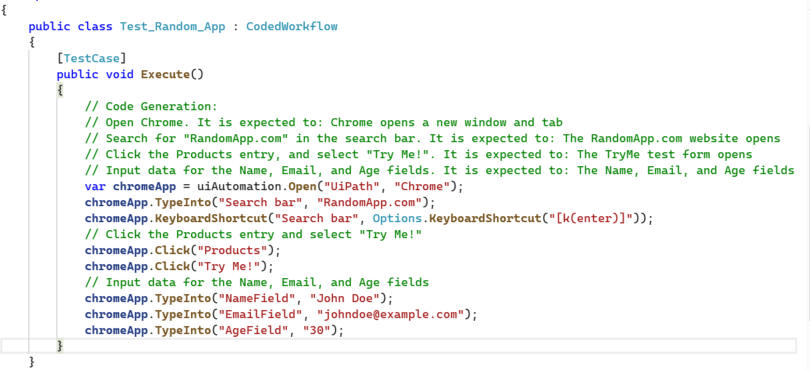
Visit Creating a coded test case from a manual test case and Generating coded test cases using AI for more information about generating test cases.