Connections troubleshooting
This page explains how to fix issues you might encounter when using connections.
Client Request Failed: Failed to receive access token
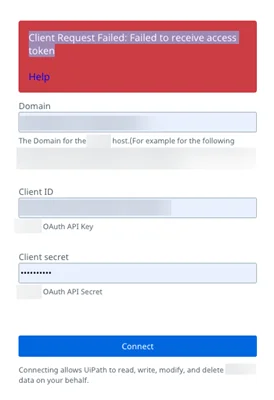
Description
This error is caused by invalid credentials or details provided by the customer.
Solution
Make sure all the populated/given credentials are valid.
The connection failed to create, please close this browser tab and try again

Description
This error is caused by invalid scopes or app permissions.
Solution
Check whether all scopes/permissions are provided as expected.
Connection is currently inactive, please click fix connection

Description
It is possible that a connection might expire due to OAuth token expiry or a refresh issue.
Solution
Select Fix connection and redo the connection creation flow. To fix a connection, select your connection's corresponding More button in the right side of the interface and select Fix connection.
Error Code: 400 Message: Cannot delete connection with one or more triggers assigned

Description
When trying to delete a connection, you might encounter the following message: Error Code: 400 Message: Cannot delete connection with one or more triggers assigned.
Solution
You cannot delete the instance when you have a trigger enabled on it. Delete the trigger before deleting the instance.
The user does not have Connections.View permissions on the connection folder.
Description
Connections in Integration Service appear to be successful (Status: Connected), but unattended jobs fail with the following error message: "The user does not have Connections.View permissions on the connection folder."
Solution
The robot needs access to the connection used in the process.
For a robot to run a job using a connector from Integration Service, the following are required:
- The connection and the robot intended to run the job must be in the same Orchestrator folder.
- The robot must be assigned a role that has Folder View permissions for the Connections item. For more information, refer to the Orchestrator User Guide.
Network restrictions
You may sometimes be unable to create connections to external applications. This is often caused by network or firewall restrictions, where the target application blocks requests from Automation Cloud because Integration Service IPs are not allowlisted.
Follow these steps to verify connectivity and resolve these issues.
-
Make sure that:
- You have the application endpoint (URL or IP) that Integration Service needs to access.
- You have access to your enterprise firewall or network settings to allowlist IP ranges if required.
-
Verify endpoint accessibility.
Use a simple network utility to check if your application endpoint is reachable from the internet.
Using curl:
curl -v https://<your-application-endpoint>If the request fails, the endpoint is not publicly accessible, or the IP is blocked.
-
Add Integration Service IPs to the allow list.
Consult the list of UiPath Automation Cloud IP ranges in the official documentation, and add Integration Service IP ranges to your application or firewall allow list.
-
Retry connection creation.
After confirming endpoint accessibility and allowlisting the IPs, attempt to create the connection again in Integration Service.
SSO-authenticated users
When logging in to UiPath Automation Cloud via SSO (e.g., Okta, Azure AD, Microsoft SSO, etc.) you may encounter issues creating connections to external applications that use the same SSO provider.
This issue occurs because Integration Service automatically uses your existing SSO session, which can cause the application to skip the login step or use the wrong account to create the connection.
Example scenario
The following example demonstrates how SSO session propagation can interfere with connection creation in Integration Service:
- UiPath SSO Login - Alejandra logs in to UiPath Automation Cloud using her corporate Okta account
alejandra@company.com. - Target Application SSO - Alice wants to create a connection to Workday REST, which also uses Okta SSO as set up by the company admin.
- Connection Creation - During the connection setup:
- The browser automatically sends her existing Okta session token.
- Workday assumes the SSO user is
alejandra@company.comwithout prompting again for login.
- The problem - If Alice intended to connect using a different Workday account, the connection may fail, or workflows may run under the wrong permissions.
Recommended workarounds
Use a private (incognito) browser session
Open the connection creation page in a private/incognito window. This prevents the browser from reusing the UiPath SSO session.
Workday will then prompt for explicit login credentials each time a connection must be created.
Switch to the intended account prior to connection creation
-
Log in to UiPath Automation Cloud via SSO.
Access Integration Service as usual.
-
Log in to Workday separately.
If the application automatically logged you in using your current SSO session, you may see a default account.
-
Log out of Workday and log in with the intended account for connection creation.
This ensures the application has the correct user session.
-
Return to Integration Service to create the connection.
Integration Service will now trigger the connection flow.
The intended account session is used for authorization, preventing wrong permissions or skipped consent prompts.