Google Vertex authentication
Prerequisites
To be able to create a connection, you need to have a Google Vertex account with the following credentials:
- Project ID
- Region
- Service account key
The Google Vertex connector requires a service account with the following permissions:
aiplatform.endpoints.predict
aiplatform.endpoints.get
aiplatform.endpoints.list
aiplatform.models.get
aiplatform.models.list
aiplatform.locations.get
For more information about Vertex AI IAM permissions, see the Google Cloud documentation.
Add the Google Vertex connection
To create a connection to your Google Vertex instance, you need to perform the following steps:
-
Select Orchestrator from the product launcher.
-
Select a folder, and then navigate to the Connections tab.
-
Select Add connection.
-
To open the connection creation page, select the connector from the list. You can use the search bar to find the connector.
-
You are redirected to the login page where you must provide your credentials, namely Project ID, Region, and Service account key.
For any secret-type field, you can select the menu next to the field and choose Use credential asset to reference an Orchestrator credential asset linked to an external vault instead of entering the value directly. For more information, see Use credential assets for connections.
-
Select Connect.
Google Cloud configuration
There are also some steps you must take in Google Cloud to make sure you can connect to Google Vertex.
-
- In Google Cloud, navigate to APIs and Services > Enabled APIs & services.

- Make sure Vertex AI API is enabled in this screen.

- Next, Navigate to IAM & Admin > Admin, select Service Accounts and Create Service Account if one does not already exist.
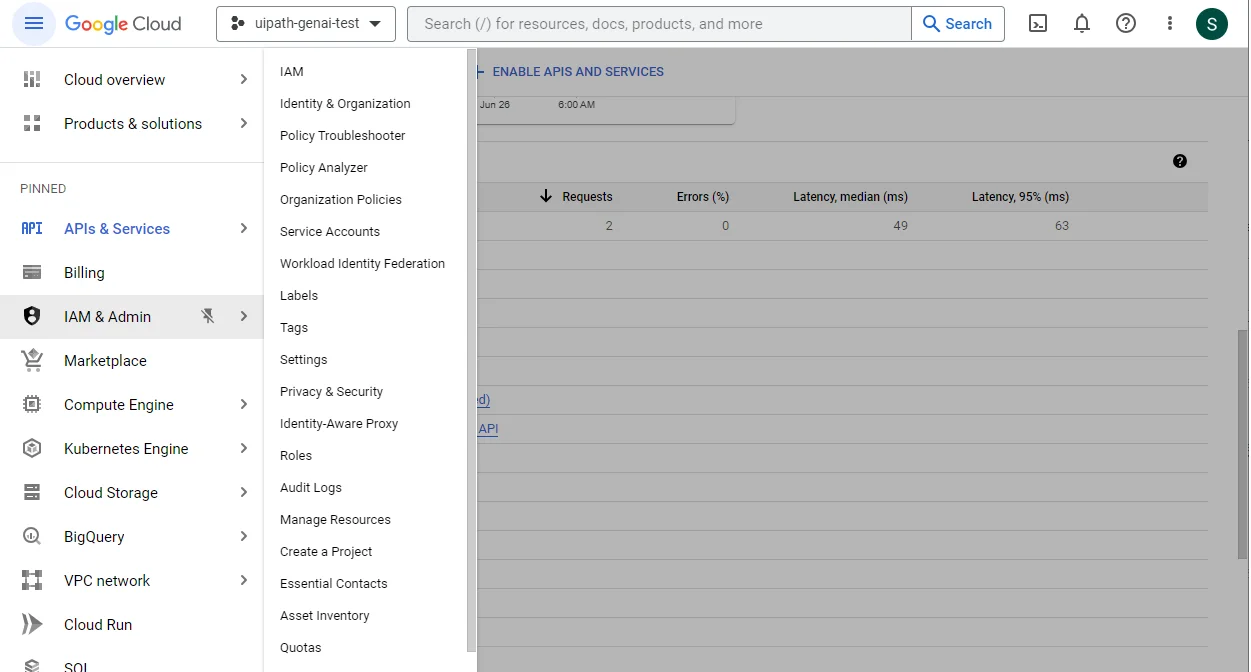
- Select the Service Account that you intend to use and add a key under the Keys tab. Select the JSON Key type.

- Paste the entire JSON payload into the Service Account Key. For any questions or help you might require, make sure to reach out to your Google Cloud admin.
- In Google Cloud, navigate to APIs and Services > Enabled APIs & services.