Start process
UiPath.Appian.Activities.StartHumanActivity
Starts a specified process with optional input variables.
Properties
Common
- DisplayName - The display name of the activity.
Input
- AllowEdit - Check box - If selected, the process can be edited.
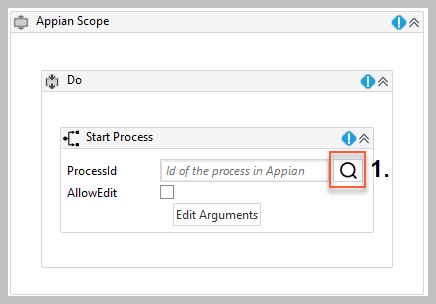
- ProcessId - The process that you want to start.
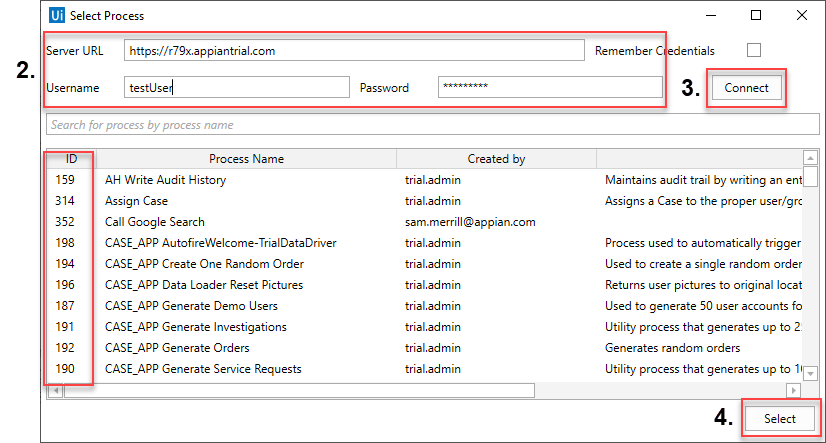
- To find the ProcessId, follow the steps below:
-
In the Designer panel, click the search icon next to the property (this opens the Select Process wizard).
-
In the Select Process wizard, enter the ServerURL, Username, and Password that you used in the Appian Scope activity.
-
Click the Connect button.
-
Select the process from the list and click the Select button.
- Process Variables - The user defined variables for the selected ProcessId.
- For more information about process variables and how to create them, see Process Model Object in the Appian help documentation.
Misc
- Private - If selected, the values of variables and arguments are no longer logged at Verbose level.
Output
- ProcessInstanceId -
String- The Id of the process assigned to the specified user or group.- Allowed values: Enter your value as a
Stringvariable.
- Allowed values: Enter your value as a