Train model
Using the source form documents stored in your specified blob storage container (Azure Storage Blob Uri), the Train Model activity calls the Form Recognizer Train Custom Model API to create and train a new custom model.
After completing the train model operation, the activity outputs the identifier assigned to the model as a String (Model Id) that you can use as an input variable in subsequent activities (e.g., Get Model Info).
How it works
The following steps and message sequence diagram is an example of how the activity works from design time (that is, the activity dependencies and input/output properties) to run time.
- Complete the Setup steps.
- Add the Azure Form Recognizer Scope activity to your project.
- Add the Train Model activity inside the Azure Form Recognizer Scope activity.
- Enter values for the Input properties.
- Create and enter a
Stringvariables for the Output properties. - Run the activity.
-
Your input properties are sent to the Train Model API.
-
The API returns the
Stringvalue to your output property variables.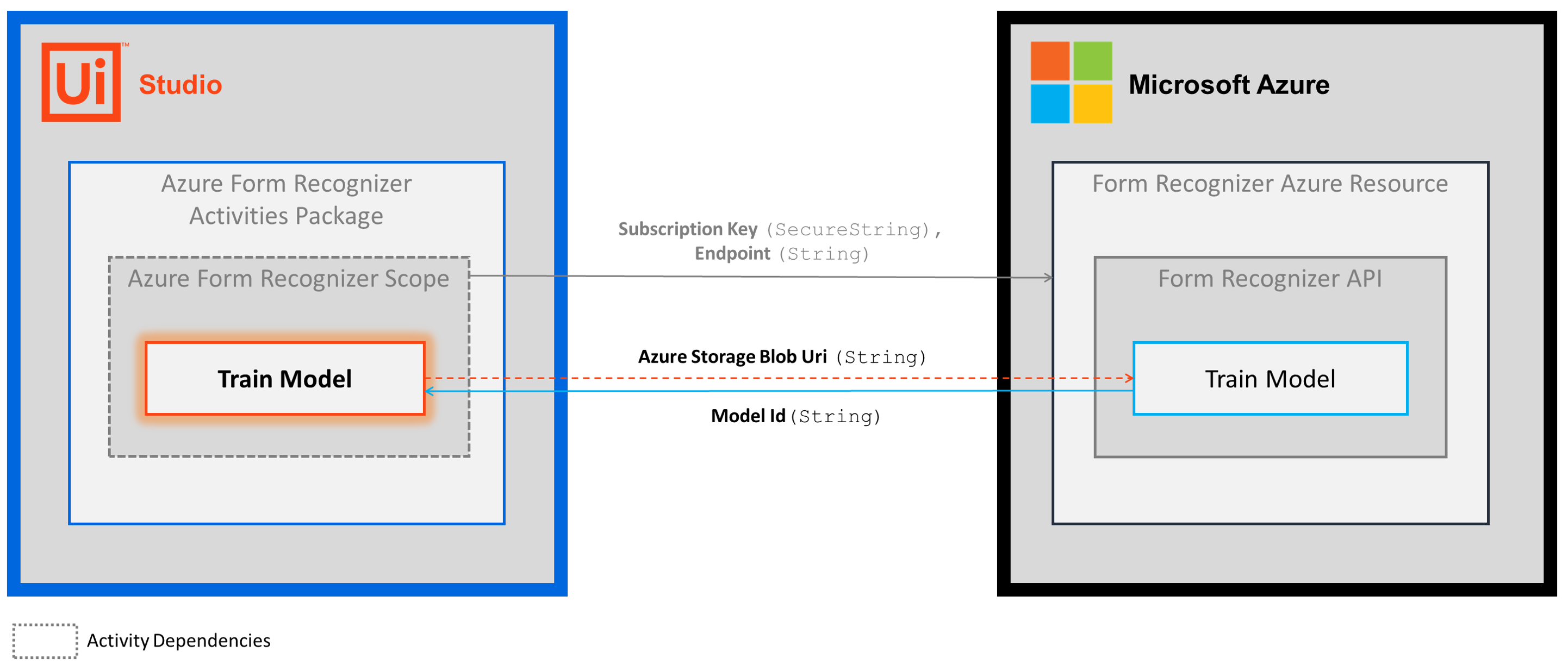
-
Properties
The values for the following properties are specified when adding this activity to your project in UiPath Studio.
Common
DisplayName
The display name of the activity.
| Attributes | Details |
|---|---|
| Type | String |
| Required | Yes |
| Default value | Train Model |
| Allowed values | Enter a String or String variable. |
| Notes | N/A |
Input
Azure Storage Blob Uri
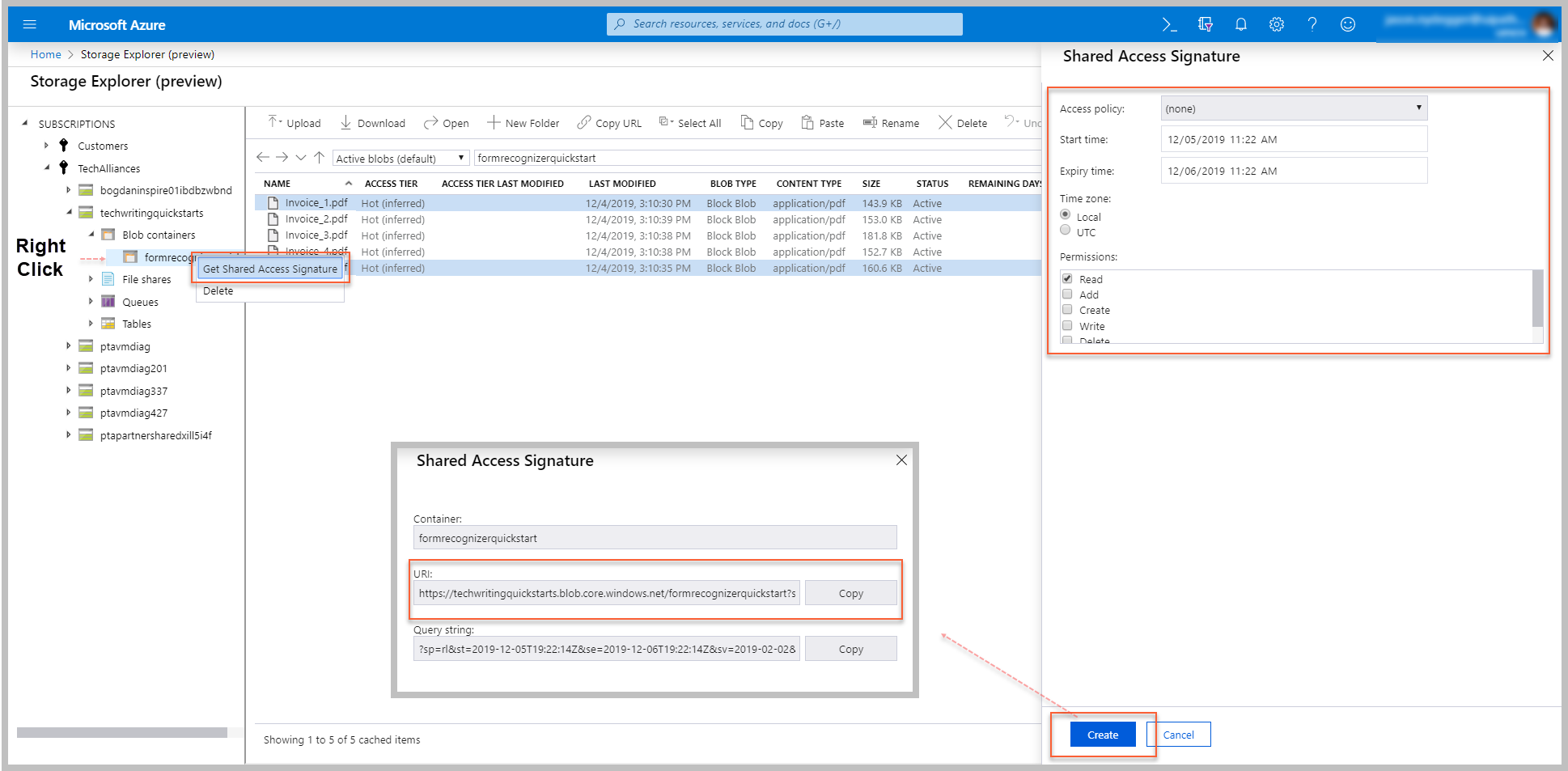
The shared access signature (SAS) URI of the Azure blob storage container that contains the source form documents to use in the training model.
| Attributes | Details |
|---|---|
| Type | String |
| Required | Yes |
| Default value | Empty |
| Allowed values | Enter a String or String variable. |
| Notes | To get the URI value, follow the Get shared access signature steps in the Setup guide (for quick reference, see image below). Supported form document formats: PNG, JPEG, and PDF (all other format types are ignored). |
Options
Include Subfolders
Indicates the source form documents are stored in a subfolder in the Azure blob storage container.
| Attributes | Details |
|---|---|
| Type | Checkbox |
| Required | No |
| Default value | Not Selected |
| Allowed values | Selected or Not Selected |
| Notes | By default, the train model operation only uses form documents located in the root of your Azure blob storage container. If your form documents are stored in a subfolder, select this option. |
Source Filter Prefix
Limits the training data set to form documents that have a name beginning with the specified value.
| Attributes | Details |
|---|---|
| Type | String |
| Required | No |
| Default value | Empty |
| Allowed values | Enter a String or String variable. |
| Notes | If your Azure blob storage container contains various form documents, you can specify which ones to include in this training model by entering the shared portion of the document names. For example, if you enter "Invoice", only the form documents with a name beginning with "Invoice" are used. |
Use Label File
If selected, the model uses label files.
| Attributes | Details |
|---|---|
| Type | Checkbox |
| Required | No |
| Default value | Not Selected |
| Allowed values | Selected or Not Selected |
| Notes | N/A |
Misc
Private
If selected, the values of variables and arguments are no longer logged at Verbose level.
| Attributes | Details |
|---|---|
| Type | Checkbox |
| Required | No |
| Default value | Not Selected |
| Allowed values | Selected or Not Selected |
| Notes | N/A |
Output
Model Id
The identifier assigned to the training model.
| Attributes | Details |
|---|---|
| Type | String |
| Required | No (required to use the output data in subsequent activities) |
| Default value | Empty |
| Allowed values | Enter a String variable |
| Notes | The variable you create for this property can be used as an input variable in other Azure Form Recognizer activities (e.g., Get Model Keys, Get Model Info). |