Overview
Publishing a Process Mining app template requires the following steps.
- Log in (work e-mail for Free, Vendor Profile for Paid).
- Pick a submission path → Free Listing or Paid Listing (Vendor Profile).
- Register your Business Profile or Vendor Profile → based on the path chosen above
- Complete the guided form (fields differ slightly by path).
- Submit & publish → your listing goes live to general public after the approval done by UiPath.
Submission paths overview
| N/A | N/A | N/A |
|---|---|---|
| N/A | Free Listing | Paid Listing (Partner Solution) |
| Core Idea | Share a template quickly; traffic is routed to your own site via an External Link. | Sell or generate leads via Marketplace with a built-in quote/lead form. |
| Starts With | Log in using any work e-mail. | Log in with Vendor Profile (requires Stripe Express + approval). |
| Best If | You already collect leads on your website and just need visibility. | You want to capture leads, handle quoting, and boost reach on Marketplace. |
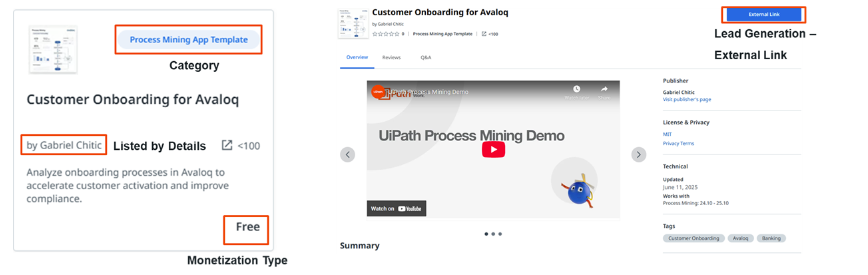
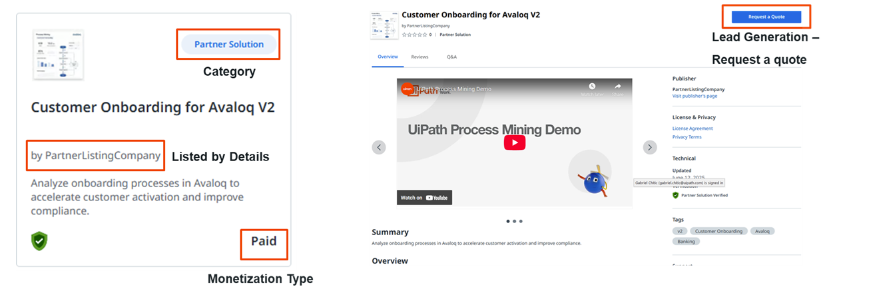
| End Result | Listing card ➜ External Link button | Listing page ➜ “Request Quote” / “Contact Partner” form. |
The following illustration shows an example of the end result of a Free Listing.
The following illustration shows an example of the end result of a Paid Listing.
Pros and cons
| N/A | N/A | N/A |
|---|---|---|
| N/A | Free Listing | Paid Listing |
| Speed to publish |  Listing approval Business Profile approval Listing approval Business Profile approval | Listing approval Vendor approval (≈1–2 days) |
| Form complexity |  Minimal (no pricing, no payout) Minimal (no pricing, no payout) | Extra tabs: Pricing, Payout, Support |
| Lead capture | None in-platform (build your own on External Link) | Built-in lead / quote form |
| Traffic | Standard (template cards) | ≈Potentially 2× higher visibility on Marketplace |
| External link | Dedicated “External Link” button | No separate button (links only in description. |
| Revenue handling | You invoice / bill off-platform | Option to manage quotes inside Marketplace |
| Setup overhead | None (no Stripe, no tax profile) | Stripe Express + company docs required + possible fees charged (Check out Payments for more details about fees) |
Advantage - Fallback