Send SMS
UiPath.Upwire.Activities.SendSms
The Send SMS activity uses one of your Upwire purchased numbers or approved alphanumeric callerIDs (From) to send an SMS message to a specified number (To). In addition to a simple string messages, you can also send a PIN for authentication.
Summary
Dependency
| Dependency | Details |
|---|---|
| Packages | UiPath.Upwire.Activities |
| Activities | Upwire Scope |
Attributes
| Attributes | Details |
|---|---|
| Inputs (Variables) | String Applies to property: From, To, and Message |
| Outputs (Variables) | N/A |
| Examples | Quickstart |
Properties
The values for the following properties are specified when adding this activity to your project in UiPath Studio.
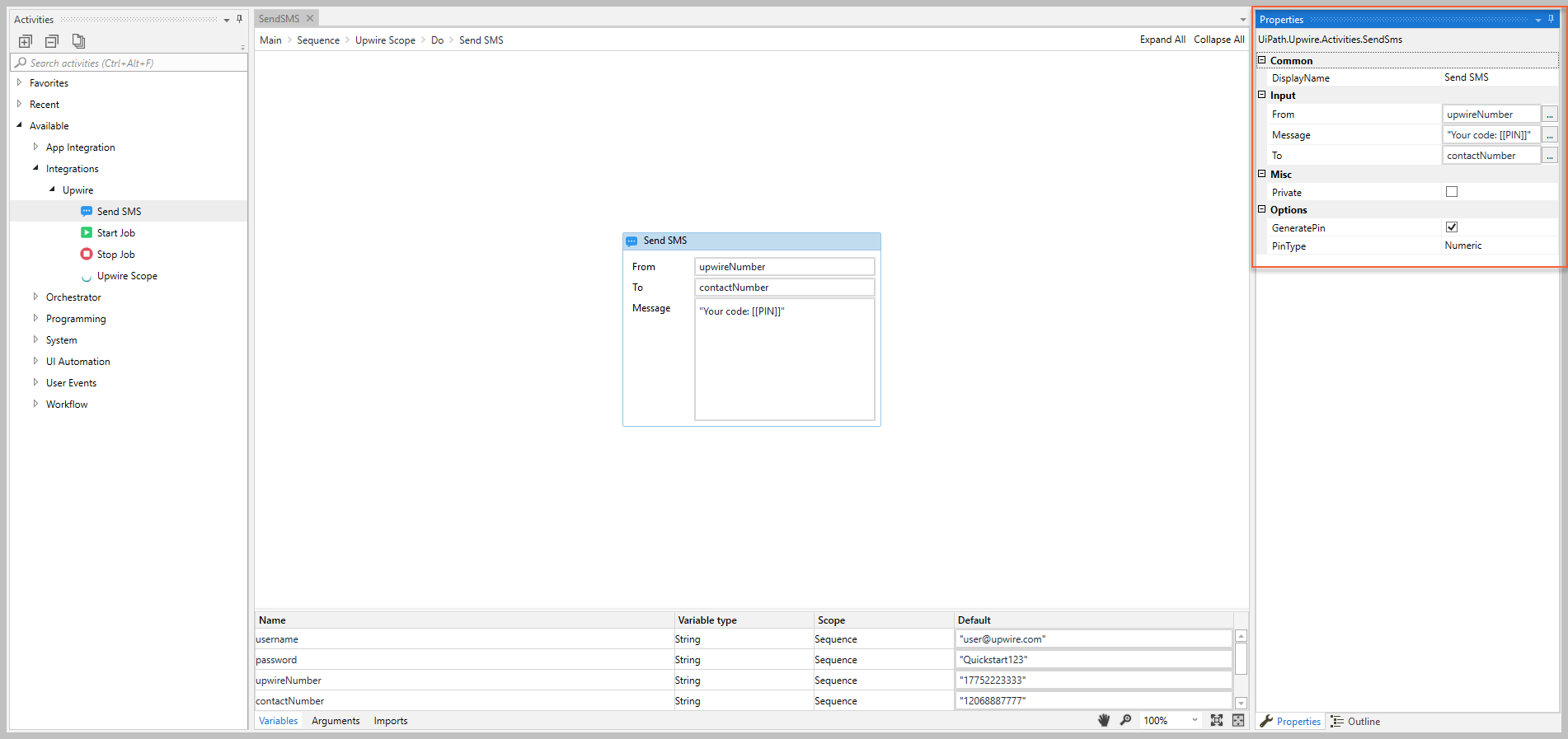
Common
DisplayName
The display name of the activity.
| Attributes | Details |
|---|---|
| Type | String |
| Required | Yes |
| Default value | Send SMS |
| Allowed values | Enter a String or String variable. |
| Notes | N/A |
Input
From
The Upwire purchased number or approved alphanumeric callerID that the message is sent from.
| Attributes |
Details |
|---|---|
| Type |
|
| Required |
Yes |
| Default value |
Send SMS |
| Allowed values |
Enter a String or String variable. |
| Notes |
|
Message
The message content to send.
| Attributes | Details |
|---|---|
| Type | String |
| Required | Yes |
| Default value | Empty |
| Allowed values | Enter a String or String variable. |
| Notes | To send a generated PIN, select the GeneratedPin checkbox and add [[PIN]] in the message string. |
To
The mobile number that you want to receive the message.
| Attributes |
Details |
|---|---|
| Type |
|
| Required |
Yes |
| Default value |
Send SMS |
| Allowed values |
Enter a String or String variable. |
| Notes |
|
Misc
Private
If selected, the values of variables and arguments are no longer logged at Verbose level.
| Attributes | Details |
|---|---|
| Type | Checkbox |
| Required | No |
| Default value | Not Selected |
| Allowed values | Selected or Not Selected |
| Notes | N/A |
Options
GeneratedPin
If selected, adding [[PIN]] in the Message is replaced with a generated code.
| Attributes | Details |
|---|---|
| Type | Checkbox |
| Required | No |
| Default value | Not Selected |
| Allowed values | Selected or Not Selected |
| Notes | You must include [[PIN]] in the Message when this property is selected, otherwise the recipient will not see the generated code. |
GeneratedPin
The type of GeneratedPin that you want to generate.
| Attributes | Details |
|---|---|
| Type | Drop-down list |
| Required | No (If GeneratedPin is selected, this property is required) |
| Default value | Numeric |
| Allowed values | Select either Numeric or Alphanumeric |
| Notes | N/A |