May 2023
May 31, 2023
What is new
Task Mining integration
When you identify a bottleneck in your process while analyzing or want to get more granular visibility, you can now start a Task Mining project from any process graph in Process Mining. This enables you to get an end-to-end view of your process including system and desktop level interactions which can help you to better understand users' behaviors and intentions better during the process execution.
Mulitple columns in horizontal bar charts
It is now possible to select the fields that define columns in a bar chart.
May 17, 2023
What is new
Chart filters
App developers can now define chart filters to filter data from the table before it is provided to the chart. When business users open a process app that contains one or more charts with chart filters set, those charts will display data according to the chart filters.
When a chart filter is defined for a chart, the  icon is displayed at the top of the chart. Business users can select the icon, to view the applied chart filters. See the illustration below.
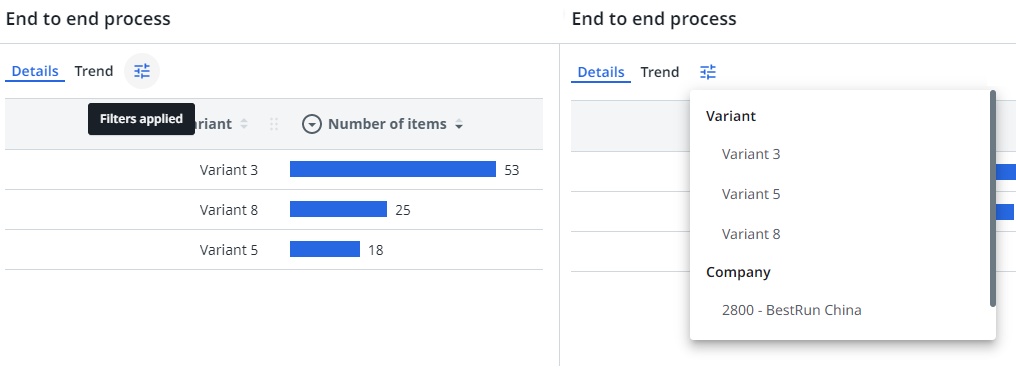
Business users still can add global filters, which are applied on top of the chart filters. Business users cannot change the chart filters.
End of upload API
The End of upload API is now provided when uploading data using an extractor.

Loading data using an extractor is now easier to set up. Before, you had to upload a marker file to signal that your extraction was finished. That setup is not needed anymore, as now you can end with an API call.
The app status will be set to Transforming data to show that the API call was successful, and transformations are running.
Marker files are marked as deprecated. They will keep working for another 6 months from now on. From November 2023, data extractors can only be used with the End of upload API call to end their extraction.
Improvements
Data Manager
It is now possible to edit the table names in Data Manager.
View logs
The option to view log files has improved. Log files are now available for all data runs. It is also possible to view the log file for a data run in progress, and to refresh the log file to monitor the progress of the data run.
The log now contains different log levels to indicate the severity of the message:
- Information;
- Warning;
- Error.
Process data
Compare is now disabled for Process data analysis.
May 3, 2023
What is new
New app template available
The following app template is now available:
- SAP-Order-to-Cash.
Improvements
General app settings
It is now possible to open the App permissions page directly from the App settings page to manage access permissions for Process Mining process apps.
Bug fixes
SAP Purchase-to-Pay app template
The currency exchange rate factor is now casted as double to ensure currency conversion is calculated correctly.