Loading data from multiple source systems
Using CData Sync, it is possible to load data from multiple different source systems into a single process app. To do that, multiple extraction jobs have to be created, each having a corresponding source connection. Each extraction job has to call the next one in its post-job events, such that all jobs are executed one-by-one. The final job has to do the API call after it has finished. The following illustration shows an overview.
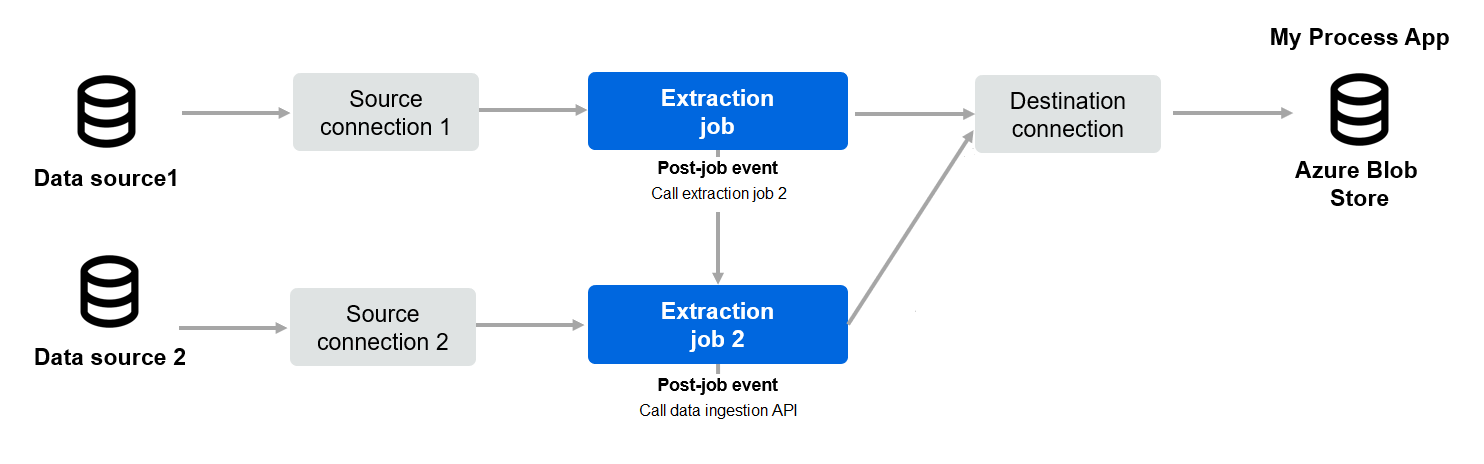
Linking jobs
In CData Sync, to make sure a job calls the next job, go to the Events tab and edit the Post-Job Event. Select the Insert Snippet action button and then select Run Job from the menu. The code to trigger a next job will be generated automatically.