Order-to-Cash input fields
Introduction
This section contains an overview of the fields for each of the input tables of Order-to-Cash. For each object the fields are listed. For each field, the name and a data type are displayed. Apart from that, it is indicated whether the field is mandatory if the object is included in the Order-to-Cash process.
Optional tables should be part of the input, but may contain no records. When a field is mandatory, it should not contain NULL values.
| Object | Tables | Mandatory Y/N |
|---|---|---|
| Sales order | Sales_orders Sales_order_items | Y |
| Deliveries | Deliveries Delivery_items | N |
| Invoice | Invoices Invoice_items Invoide_cancellations | N |
| Accounting | Accounting_documents | N |
| Payment | Payments | N |
| Events* | Event | Y |
*) Events is not an object of the Order-to-Cash process, but an events table is mandatory for a correct working of the Order-to-Cash process app.
The following illustration shows the relations between objects of Order-to-Cash.
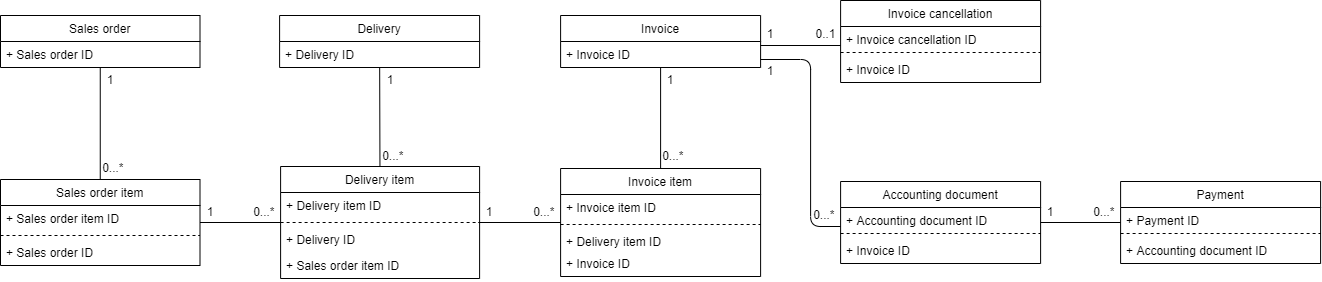
Table names and field names are case-sensitive. Always make sure that the field names (column headers) in your dataset match the field names (in English) in the following tables and that the file names match the table names.
Field types
The following table describes the different field types and their default format settings.
| Field type | Format |
|---|---|
| boolean | true, false, 1, 0 |
| date | yyyy-mm-dd |
| datetime | yyyy-mm-dd hh:mm:ss[.ms], where [.ms] is optional. Refer to the official Microsoft documentation if you want to change the date format. |
| double | Decimal separator: . (dot) Thousand separator: none |
| integer | Thousand separator: none |
| text | N/A |
Sales order
Sales_orders
The following table describes the fields of the Sales_orders table.
| Name | Type | Mandatory Y/N | Description |
|---|---|---|---|
Sales_order_ID | text | Y | The unique identifier of the sales order. |
Company | text | N | The company for which the sales order is created. |
Customer | text | N | The customer for whom the sales order is created. |
Customer_country | text | N | The country associated to the customer. |
Customer_region | text | N | The region associated to the customer. |
Distribution_channel | text | N | The distribution channel associated to the sales order. |
Division | text | N | The division associated to the sales order. |
Requested_delivery_date | date | N | The customer’s requested delivery date for the sales order. |
Sales_group | text | N | The sales group associated to the sales order. |
Sales_office | text | N | The sales office associated to the sales order. |
Sales_order_creator | text | N | |
Sales_order_type | text | N | The sales order type of the sales order. |
Sales_organization | text | N | The sales organization of the sales order. |
Sales_order_items
The following table describes the fields of the Sales_order_items table.
| Name | Type | Mandatory Y/N | Description |
|---|---|---|---|
Sales_order_item_ID | text | Y | The unique identifier of the sales order item. |
Sales_order_ID | text | N | The unique identifier of the sales order. |
Category | text | N | The category of sales order item. |
Creation_date | date | N | The date on which the sales order item is created. |
Incoterms | text | N | The incoterms associated to the sales order item. |
Latest_expected_delivery_date | date | N | The latest expected delivery date of (parts of) the sales order item. |
Material | text | N | The material sold. |
Material_group | text | N | The categorization of the material sold. |
Payment_terms | text | N | The terms of payment associated to the sales order item. |
Plant | text | N | The plant associated to the sales order item. |
Profit_center | text | N | The profit center associated to the sales order item. |
Quantity | text | N | The quantity and unit of measurement sold. |
Sales_order_item | text | N | A user-friendly name to identify the sales order item |
Sales_order_item_creator | text | N | |
Shipping_point_country | text | N | The country where the goods are delivered associated to the sales order item. |
Storage_location | text | N | Storage location associated to the sales order item. |
Value | double | N | A monetary value related to the sales order item. |
Delivery
Deliveries
The following table describesthe fields of the Deliveries table.
| Name | Type | Mandatory Y/N | Description |
|---|---|---|---|
Delivery_ID | text | Y | The unique identifier of the delivery. |
Company | text | N | |
Delivery_creator | text | N | |
Delivery_date | date | N | |
Delivery_type | text | N | |
Incoterms | text | N | |
Planned_delivery_date | date | N | |
Sales_organization | text | N | |
Shipping_conditions | text | N | |
Staging_area | text | N | |
Warehouse_number | text | N |
Delivery_items
The following table describes the fields of the Delivery_items table.
| Name | Type | Mandatory Y/N | Description |
|---|---|---|---|
Delivery_item_ID | text | Y | The unique identifier of the delivery item. |
Delivery_ID | text | N* | The unique identifier of the delivery. |
Sales_order_item_ID | text | N* | The unique identifier of the sales order item. |
Delivery_item_creator | text | N | |
Category | text | N | |
Delivery_item_is_invoiced | boolean | N | Indicates if the sales order item is released to invoicing. |
Delivered_quantity | text | N | |
Material | text | N | |
Material_group | text | N | |
Plant | text | N | |
Storage_location | text | N | |
Value | double | N |
- If you want to include events related to other objects than the sales order in the process graphs, the
Delivery_IDandSales_order_item_IDfields are mandatory.
Invoice
Invoices
The following table describes the fields of the Invoices table.
| Name | Type | Mandatory Y/N | Description |
|---|---|---|---|
Invoice_ID | text | Y | The unique identifier of the invoice. |
Baseline_date | date | N | |
Company | text | N | |
Discount | double | N | |
Discount_percentage_1 | double | N | |
Discount_percentage_2 | double | N | |
Discount_period_1 | integer | N | |
Discount_period_2 | integer | N | |
Fiscal_year | text | N | |
Incoterms | text | N | |
Invoice_creator | text | N | |
Invoice_date | date | N | |
Invoice_type | text | N | |
Net_payment_period | integer | N | Net payment period of the invoice in days. |
Payment_method | text | N | |
Payment_terms | text | N | |
Posting_date | date | N | |
Sales_organization | text | N | |
Shipping_conditions | text | N |
Invoice_items
The following table describes the fields of the Invoice_items table.
| Name | Type | Mandatory Y/N | Description |
|---|---|---|---|
Invoice_item_ID | text | Y | The unique identifier of the invoice item. |
Delivery_item_ID | text | N* | The unique identifier of the delivery item. |
Invoice_ID | text | N* | The unique identifier of the invoice. |
Category | text | N | |
Invoice_item_creator | text | N | |
Invoice_item_is_cancelled | boolean | N | Indicates if the invoice item is cancelled. |
Invoice_item_is_released_into_accounting | boolean | N | Indicates if the invoice item is billable. |
Invoiced_quantity | text | N | |
Material | text | N | |
Material_group | text | N | |
Plant | text | N | |
Value | double | N |
- If you want to include events related to other objects than the sales order in the process graphs, the
Invoice_IDandDelivery_item_IDfields are mandatory.
Invoice_cancellations
The following table describes the fields of the Invoice_cancellations table.
| Name | Type | Mandatory Y/N | Description |
|---|---|---|---|
Invoice_cancellation_ID | text | Y | The unique identifier of the invoice cancellation. |
Invoice_ID | text | N* | The unique identifier of the invoice that is cancelled. |
Company | text | N | |
Fiscal_year | text | N | |
Incoterms | text | N | |
Invoice_cancellation_creator | text | N | |
Invoice_date | date | N | |
Invoice_type | text | N | |
Sales_organization | text | N | |
Shipping_conditions | text | N |
- If you want to include events related to other objects than the sales order in the process graphs, the
Invoice_IDfield is mandatory.
Accounting
Accounting_documents
The following table describes the fields of the Accounting_documents table.
| Name | Type | Mandatory Y/N | Description |
|---|---|---|---|
Accounting_document_ID | text | Y | The unique identifier of the accounting document. |
Invoice_ID | text | N* | The unique identifier of the invoice. |
Accounting_document_creator | text | N | |
Accounting_document_is _cancelled | boolean | N | Indicates if the accounting document is cancelled. |
Accounting_document_is _cleared | boolean | N | Indicates if the accounting document has been handled and is closed. |
Baseline_date | date | N | |
Company | text | N | |
Discount | double | N | |
Discount_percentage_1 | double | N | |
Discount_percentage_2 | double | N | |
Discount_period_1 | integer | N | |
Discount_period_2 | integer | N | |
Document_date | date | N | |
Document_type | text | N | |
Fiscal_year | text | N | |
Net_payment_period | integer | N | |
Payment_date | date | N | |
Payment_method | text | N | |
Payment_status | text | N | |
Payment_terms | text | N | |
Posting_date | date | N | |
Transaction_type | text | N | |
Value | double | N |
- If you want to include events related to other objects than the sales order in the process graphs, the
Invoice_IDfield is mandatory.
Payment
Payments
The following table describes the fields of the Payments table.
| Name | Type | Mandatory Y/N | Description |
|---|---|---|---|
Payment_ID | text | Y | The unique identifier of the payment. |
Accounting_document_ID | text | N* | The unique identifier of the accounting document. |
Company | text | N | |
Fiscal_year | text | N | |
Payment_creator | text | N | |
Payment_is_complete | boolean | N | |
Payment_is_debit | boolean | N | |
Value | double | N |
- If you want to include events related to other objects than the sales order in the process graphs, the
Accounting_document_IDfield is mandatory.
Events
Events
The Events table contains all sub-event logs for all objects. The following table describes the fields of the Events table.
| Name | Type | Mandatory Y/N | Description |
|---|---|---|---|
Activity | text | Y | The name of the event. This describes the step in the process. |
Accounting_document_ID | text | Y | The unique identifier of the accounting document. |
Delivery_ID | text | Y | The unique identifier of the delivery. |
Delivery_item_ID | text | Y | The unique identifier of the delivery item. |
Event_end | datetime | Y | The timestamp associated with the end of executing the event . |
Invoice_ID | text | Y | The unique identifier of the invoice. |
Invoice_item_ID | text | Y | The unique identifier of the invoice item. |
Invoice_cancellation_ID | text | Y | The unique identifier of the invoice cancellation. |
Payment_ID | text | Y | The unique identifier of the payment. |
Sales_order_ID | text | Y | The unique identifier of the sales order. |
Sales_order_item_ID | text | Y | The unique identifier of the sales order item. |
Activity_category | text | N | The type of activity that takes place (e.g. change, set/remove block) |
Activity_order | integer | N | The number that defines in which order activities are executed in case they have the same Event end. |
Activity_trigger | text | N | Field describing the reason for the executed activity |
Automated | boolean | N | Indicator whether the event is manually executed or automated. |
Department | text | N | The department that executed the event |
Event_detail | text | N | Information related to the event. |
User | text | N | The user who executed the event. |
User_function | text | N | The function associated with the user. |
User_type | text | N | The categorization of the user. |
Event_cost | double | N | The costs of executing the event. |
Event_start * | datetime | N | The timestamp associated with the start of executing the event. |
Event_processing_time | integer | N | The time for executing the event (in milliseconds). |
If both Event_start and Event _end are defined in your dataset, the duration of the event is known. This will be used to calculate the throughput time of events. If only Event_end end is defined, the throughput time will be calculated as the difference between previous Event_end and the Event_end. Event_start is only taken into account if every record in the dataset contains a not-null value.
It is expected that for each record exactly one of the ID fields is filled in, which is the one of the object on which the event takes place. The other ID fields may be empty. Next to the standard mandatory fields (Activity and Event_end), one object ID is mandatory. This field depends on the object the event is part of. If your dataset contains events where Event_start occurs after Event_end, Event_start is automatically set to the Event_end date, as this would otherwise result in a negative cycle time. A warning message is displayed in the ingestion log.