Expressions
The Logic configuration editor enables you to build expressions using logic blocks. You can drag and drop the available Logic blocks from the side panel to the Logic configuration canvas.
You can use the Expand all and Collapse all icons to view or hide all the available Logic blocks. The Search function enables you to quickly search for a Logic block.
When you select a component on the canvas, you can define the parameters for the component.
NULL values
NULL means that a data value does not exist in the data or that the value is unknown.
For example, if you have a source table for Customers, and some customers did not provide a phone number, the Phone_number field for those customers will be marked as NULL.
Calculations involving NULL values will themselves yield a NULL value. For example 7 + NULL = NULL, because the value of NULL is unknown, there is no way to add seven to nothing.
You can use the Compare functions IS NULL and IS NOT NULL to check whether the value of a field or expression is NULL or not NULL.
NULL is not the same as zero (0), or an empty value (""). Zero (0) is a number, and an empty value is a value with no characters. NULL, represents the absence of a value altogether.
Example field: Needs review
The following illustration shows an example of nested IF - THEN - ELSE statements and an AND comparison.
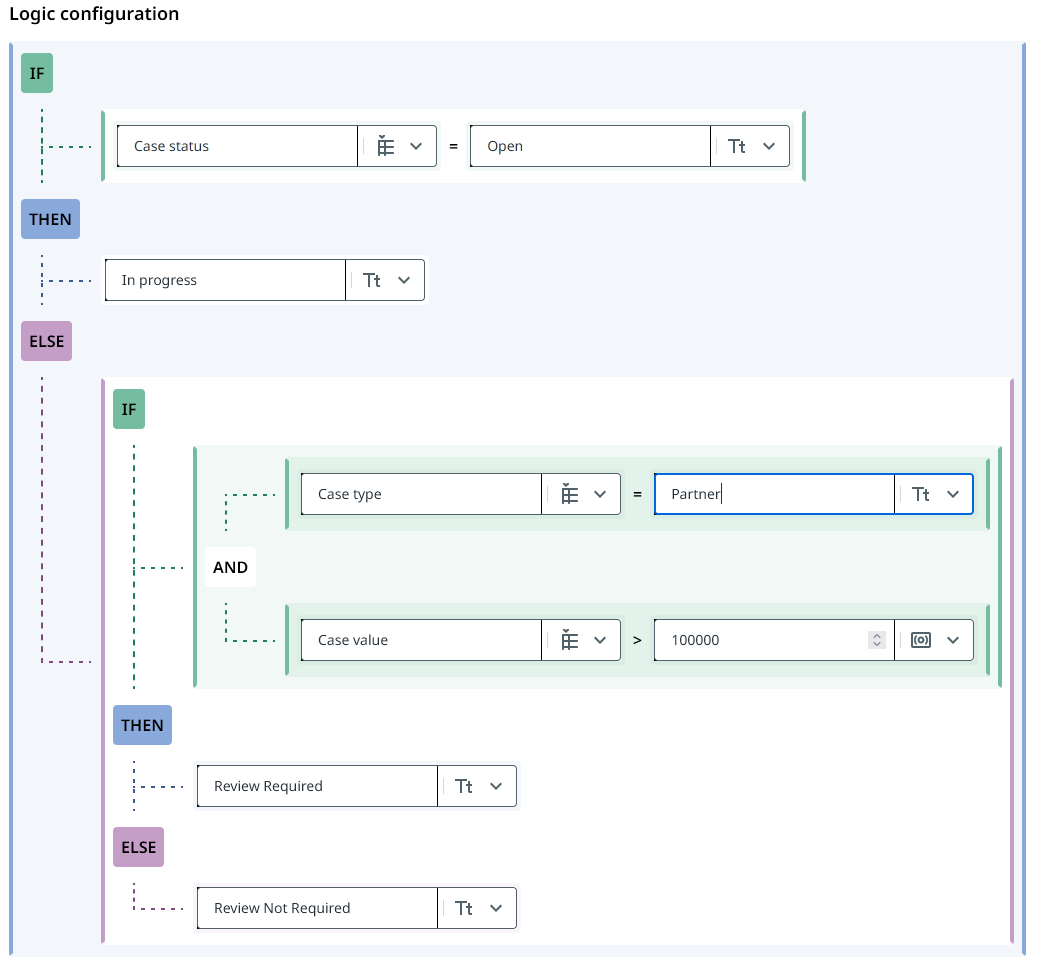
This example creates a new Needs review field in the Cases table**.** This field defines the cases that have a value more than 100,000 that you want to have reviewed by a partner.
- The first
IF - THEN - ELSEfunction checks ifCase statusisOpen. If the condition returnstruethe case is set toIn progress. If the condition returnsfalse, theELSEargument is executed. - The second
IF - THEN - ELSEfunction checks if theCase typeisPartnerand theCase valueis more than 100,000 using anANDcomparison. If theANDcomparison returnstrue, the case is set toReview Required. If theANDcomparison returnsfalse, theELSEargument is executed which sets the case toReview Not Required.
The following illustration shows an example result of the logic configuration.
