Defining new input tables
Follow these steps to add a new table that was added to your input data.
Make sure the input data needed for your new table is available in your app. Check out Loading data.
-
Go to the Data transformations editor.
-
Add the new input table to the
sources.ymlfile.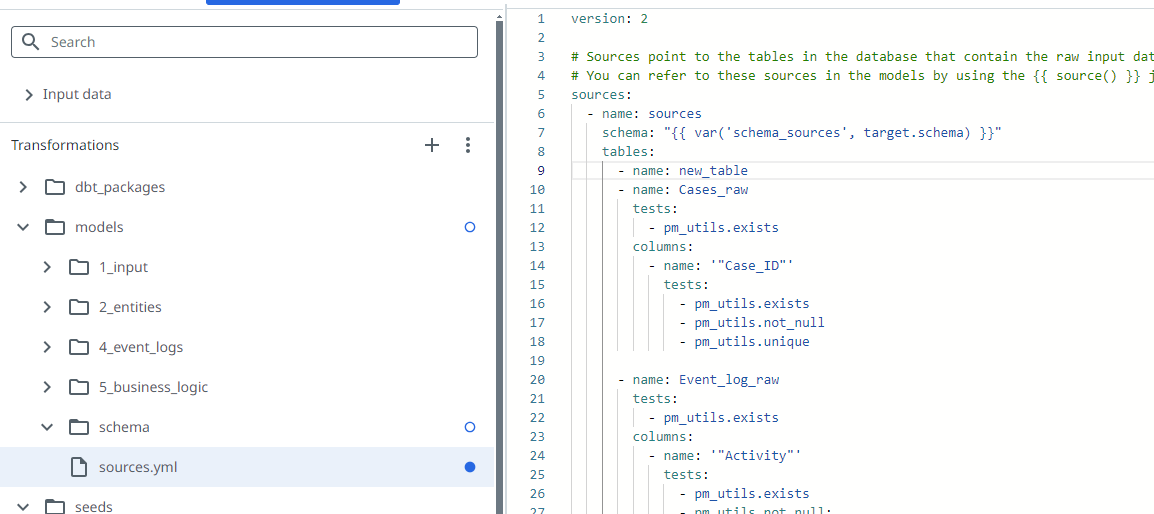
-
Add a new file for the input table in the models -> 1_input section of the Transformations.
-
Add the fields in the
selectstatement.tipUse the
pm_utils.mandatoryandpm_utils.optionalmacros to define mandatory and optional fields from the pm_utils library.pm_utils.mandatoryLoads and type-casts a column. If the source column does not exist, an error is thrown. pm_utils.optionalLoads and type-casts a column. If the source column does not exist, a column is created with value NULL. -
For each field:
- Set the correct field type. For example
, 'double'. - Name the field using an alias. For example
as "Case_ID".
- Set the correct field type. For example
The following code shows an example of a table definition.
  ```
  /* Some fields in this table are optional. These fields are created in the SQL if they do not exist in the source data. */
  with Cases_input as (
     select
        -- Mandatory
        {{ pm_utils.mandatory(source_table, '"Case_ID"') }} as "Case_ID",
        -- Optional
        {{ pm_utils.optional(source_table, '"Case"') }} as "Case",
        {{ pm_utils.optional(source_table, '"Case_status"') }} as "Case_status",
        {{ pm_utils.optional(source_table, '"Case_type"') }} as "Case_type",
        {{ pm_utils.optional(source_table, '"Case_value"', 'double') }} as "Case_value"
     from {{ source_table }}
  )

  select*from Cases_input
  ```
To make the new fields available for use in your dashboards, the fields must be added to an output table. Check out Adding fields for a description on how to create output fields.
Field types
The following table describes the different field types and their default format settings.
| Field type | Format |
|---|---|
| boolean | true, false, 1, 0 |
| date | yyyy-mm-dd (default) |
| datetime | yyyy-mm-dd hh:mm:ss[.ms], where [.ms] is optional. (default) |
| double | Decimal separator: . (dot) Thousand separator: none |
| integer | Thousand separator: none |
| text | N/A |