Customizing the detail slider
Introduction
The Detail slider enables end-users to reduce the complexity of the Process graph, which will increase the readability of the graph.

When the Detail slider is set to 100%, every possible path in the process is shown in the Process graph. When the Detail slider is set to 0%, only the most important path in the process is shown in the Process graph from start to end, where all other paths are hidden. If the Detail slider is set to any other percentage, the most important paths of the process are displayed according to the selected percentage.
A single path in the Process graph is composed by a unique sequence of edges. The importance of a path in the process is determined by the number of cases that pass the edges.
Auto mode
When the Detail slider is set to AUTO the right slider percentage to get a readable graph on-screen is automatically determined.
Customizing the detail slider
By default, when you create a new Process graph the Detail slider is visible and the display percentage is set to AUTO, which means that the most optimal readability detail for the Process graph will be detected.
You can hide the Detail slider, or you can set a default percentage for the slider in the Advanced Process Graph Settings.
Hiding the detail slider
Follow these steps to hide the Detail slider on a process graph.
| Step | Action |
|---|---|
| 1 | Click on the Process graph and go to the Process Graph tab. |
| 2 | Click on ADVANCED... in the General panel. |
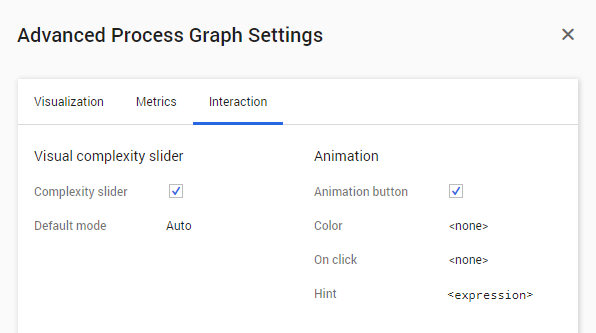
| 3 | Go to the Visual complexity slider section on the Interaction tab. |
| 4 | Disable the Complexity slider check box. See illustration below. |
| 5 | Click on OK. |
Setting the default mode
If the Complexity slider check box is disabled, the Default mode field is not available.
Follow these steps to change the Default mode for the Detail slider.
| Step | Action |
|---|---|
| 1 | Go to the Visual complexity slider section on the Interaction tab. |
| 2 | Click on Auto next to Default mode. |
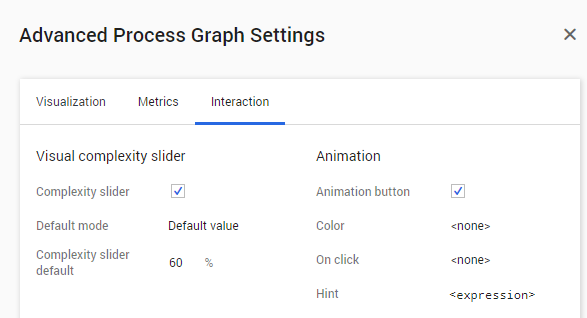
| 3 | Select Default value from the drop-down menu. The Complexity slider default field is displayed. |
| 4 | Double-click on 100 and enter the desired percentage for the Detail slider. |
| 5 | Click on OK. |