Dashboard item size
Introduction
You can create dashboards with items of different sizes. The Positioning tab of the Edit Dashboard item dialog displays the current position settings of the selected dashboard item. The Default size field displays the current size of the selected dashboard item.
Below is a description of the elements of the elements of the Positioning tab.
| Element | Enables you to... |
|---|---|
| Size in percentages | specify the size in percentages instead of in pixels. |
| Default size | change the size of the selected dashboard item. |
| Position | change the position of the selected dashboard item. |
| User resizable | give the end user the option the manually change the size of the dashboard item. |
The size of a dashboard item with Center position is dependent on the available space. For example, if the left chart in the demo has a default size of 20%, the center chart automatically uses the remaining 80% of the space.
Containers and tab containers
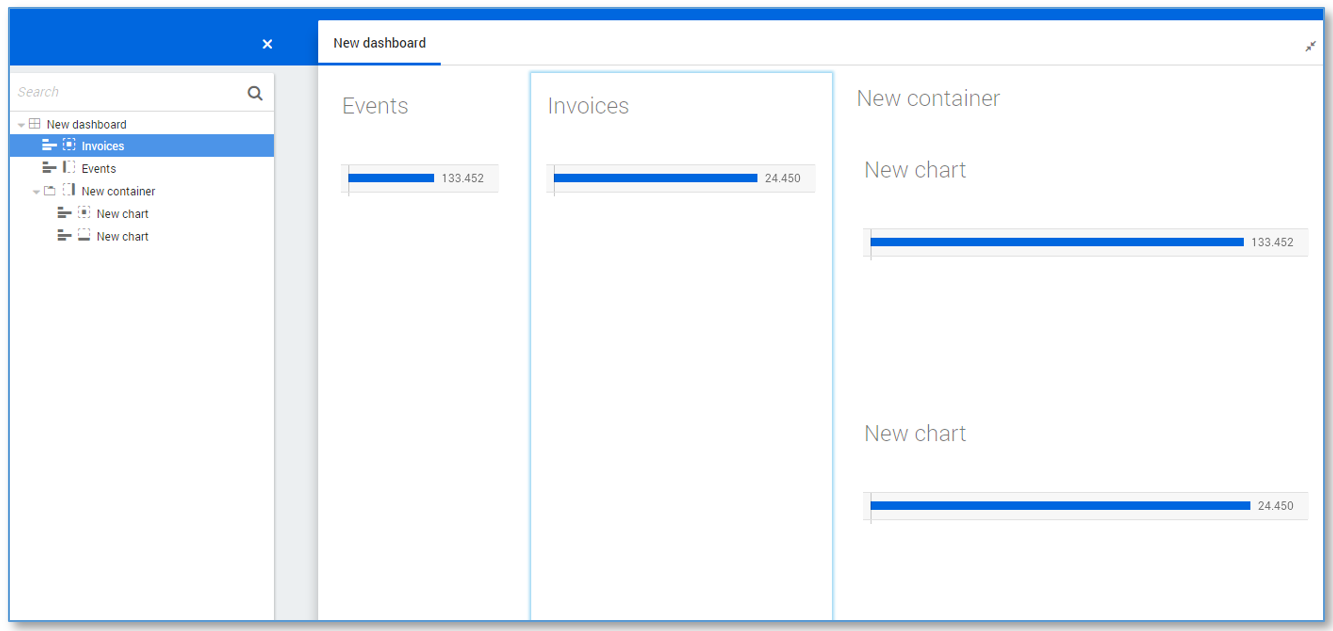
Containers can be used to group dashboard items together. Using a container gives much more flexibility in designing dashboards. Containers can be positioned in the same way as dashboard items. The items in a container can be positioned relative to that container.
When containers are used to position other dashboard items, the header of the container can be disabled.
Follow these steps to create a container.
| Step | Action |
|---|---|
| 1 | Go to a dashboard with multiple charts. |
| 2 | Right-click in the dashboard item list and select New container. |
| 3 | Drag and drop the two charts into New container. |
| 4 | Change the position of the container as desired. |
See illustration below for an example.
Using a tab container, end users can switch between different tabs that each contains a container with dashboard items.
Follow these steps create a tab container.
| Step | Action |
|---|---|
| 1 | Right-click on a container in the dashboard item list and select Edit.... |
| 2 | Select the Tab container check box and click on OK. |
The dashboard items in the container are now visible as different tabs. This can be used to reduce the total number of actual dashboards.