From data to dashboard
Introduction
This page describes the necessary steps to roll out a customized version of app or discovery accelerator to end-users. It starts with the input data and covers all the steps that are needed to provide the data in a meaningful way to end-users.
From data to dashboard
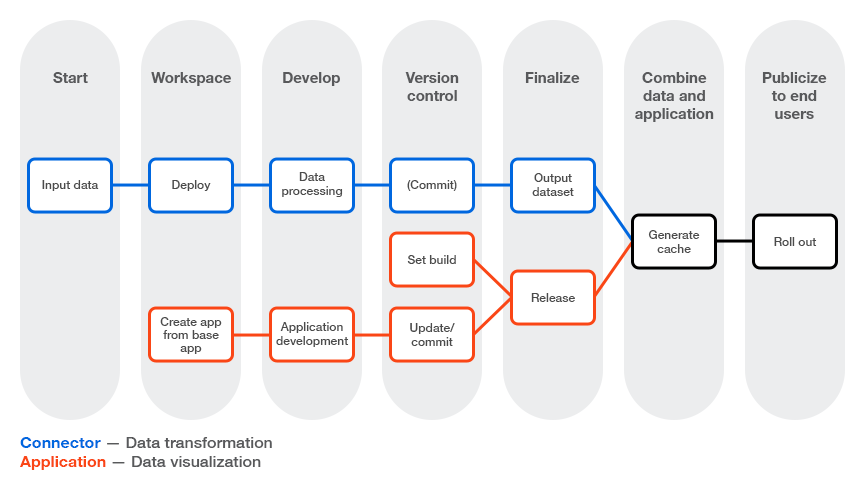
Steps in the Connector
The steps below refer to the Basic Connector, but you can do this in the same way for the SAP Connectors.
Step 1: Input tables of the Basic Connector.
Step 2: Deploying a Connector (.mvp).
Step 3: Transform the data in an appropriate event log.
Step 4: Commit your changes in the connector.
Step 5: Export the output dataset from the connector - Exporting the output data set.
If you did not make any changes to the dataset, it is not needed to export the dataset.
Steps in the App or Discovery Accelerator
Step 1: Create a new app and use the latest version of the app or discovery accelerator as the base app - Creating an app from a base app.
Step 2: Make the desired changes, see App and Discovery accelerator development.
Step 3: Set the build version - Setting a version number.
Step 4: Commit your changes.
Step 5: Create a release.
If you did not make any changes to the app or discovery accelerator, it is not needed to create a new release.
Steps to roll out the App or Discovery Accelerator with the new dataset
Step 6: Generate a cache with the created release and the output dataset.
Step 7: Deploy the release to make the changes available to end-users.