Separate development and production environments
Introduction
This page describes a suggested setup for separate production and development environments. This enables you to work together with multiple developers on a SQL connector. After all changes are done, a finished SQL connector can be released to a production environment.
See the illustration below for an overview of the suggested setup.
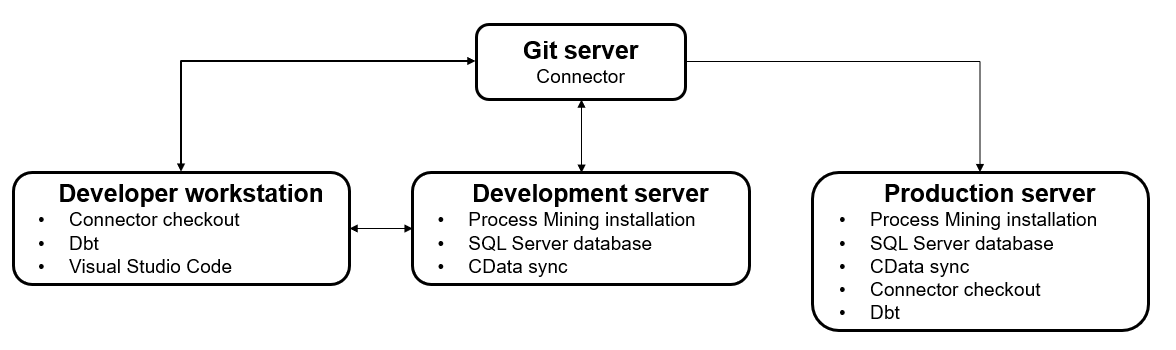
This is a suggested setup.
SQL Server Database
There are two instances of the SQL Server database, one for development and one for production.
| SQL Server database instance | Description |
|---|---|
| Development database | • All developers should have access to the development database to inspect the data and validate transformations. • A schema per developer (per connector) should be created to ensure that developers do not interfere with each others work while running transformations during development. |
| Production database | • Access to the production database can be granted on a need-to-have basis or based on a certain role. • Only one schema is required that contains the production data. |
Instead of two separate SQL Server database instances you can choose to store the development and the production schemas in one SQL Server database.
CData Sync
There are two instances of CData Sync, one for development and one for production. For both instances, the basic installation instructions should be followed. However, there are some differences in configuration.
| CData Sync instance | Description |
|---|---|
| Development environment | • A CData Sync user account per developer should be created such that each developer can create connections and jobs for development and testing purposes. |
| Production environment | • Only user accounts needed to configure production runs are needed. • Only jobs and connections necessary to extract production data and store it in the production SQL database are required. |
Instead of two separate CData Sync instances you can choose to store the development and the production jobs in one CData Sync instance.
Dbt
Dbt needs to be installed on the local development workstations and on the production server. Local developers only use the development database, whereas the production instance of dbt will connect to the production database.
Dbt consists of multiple parts, the core dbt-core and some adapters like dbt-sqlserver. Make sure the version of each of the components is the same on all environments to prevent problems. Refer to the dbt documenation for a list of available adapters.
Connector Checkout
See Setting up a SQL connector for a description on how to make a connector checkout for a new SQL connector.