ST-USG-005 - Hardcoded Activity Properties
Rule ID: ST-USG-005
Scope: Activity
Description
The rule checks whether activity properties received hardcoded values. By default, it checks the following activities: State Machine, and State.
Recommendation
Avoid using hardcoded values for activity properties. Use default activity property values, variables and/or arguments as much as possible for keeping your process robust and dynamic.
Modifying the Rule
In the Project Settings window, select the Workflow Analyzer tab. Find the rule and select the rule, as in the image below:
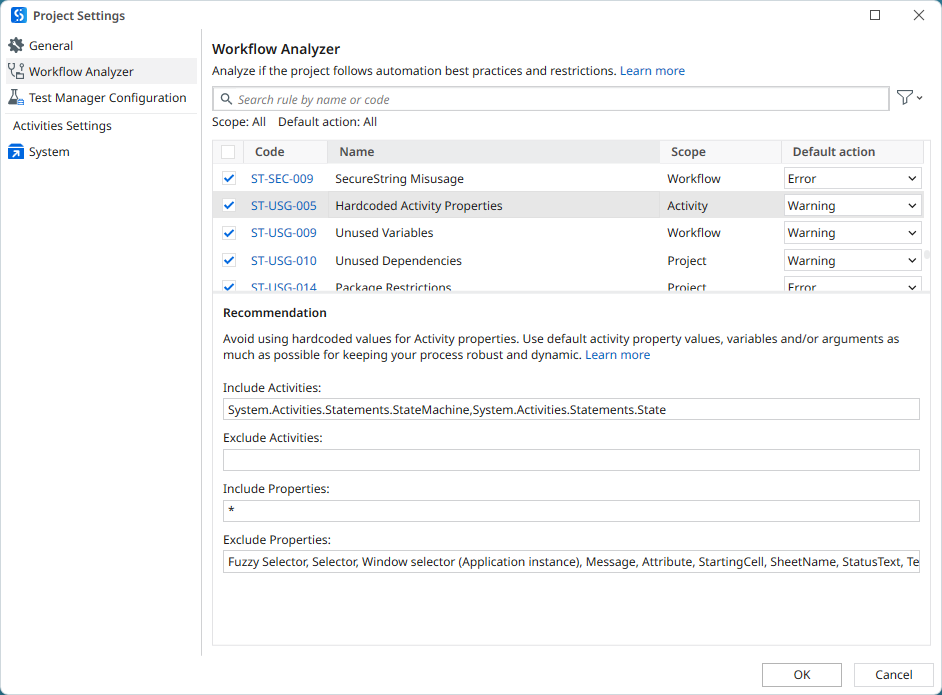
You can edit the following options:
- Include Activities: Add activity namespaces to the default list, separated by a comma.
- Exclude Activities: Add activity namespaces that should be excluded, separated by a comma.
- Include Properties: Add activity properties, separated by a comma.
- Exclude Properties: Add activity properties that should be excluded, separated by a comma.
note
To scan all activities or properties, clear the list, and then add only the asterisk
*wildcard character.
Reset to Default
By default, it checks the following activities: System.Activities.Statements.StateMachine,System.Activities.Statements.State.
To reset the value to default right-click the rule in the Project Settings window, and then click Reset to default.