Group Policy conflict
Description
When installing the UiPath extension for Chrome using Group Policy the ExtensionInstallForcelist is updated at the machine level.
This can cause a conflict if the ExtensionInstallForcelist is also defined at the user level or using Chrome Cloud Policies.
Because the machine level has priority, the extensions set at the user/cloud level are uninstalled.
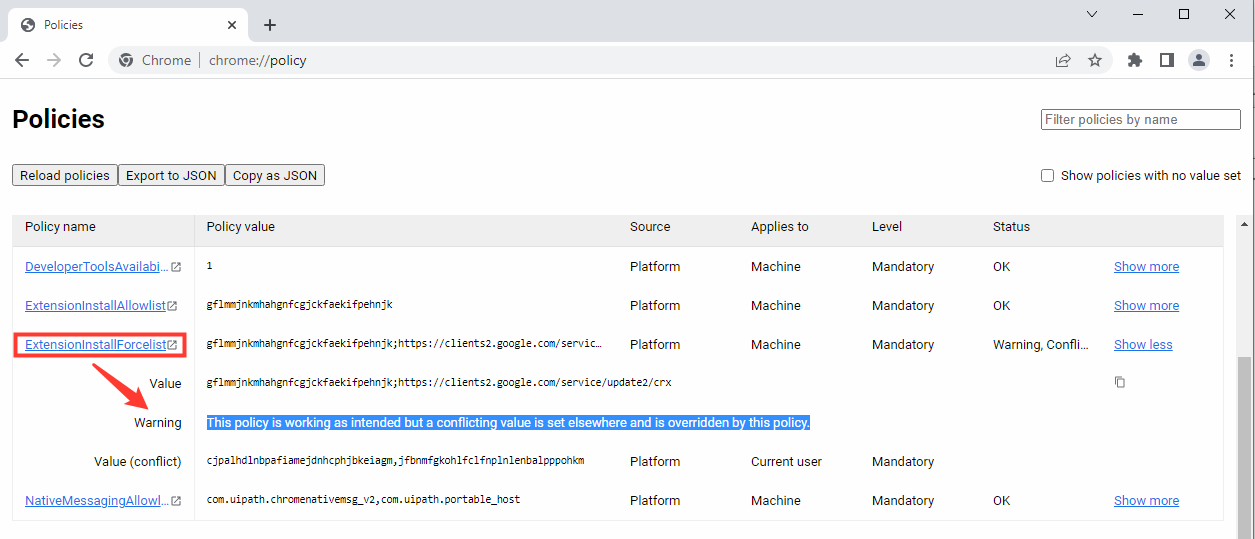
To confirm this, check at chrome://policy if this warning is displayed under ExtensionInstallForcelist:
This policy is working as intended but a conflicting value is set elsewhere and is overridden by this policy.
Solution
To solve this conflict follow these steps:
- Install the UiPath extension for Chrome using the
NativeHostOnlyinstallation method. This installation method enables communication between the extension and Studio/Robot. It does not make any changes to the Group Policies.
To use this installation method add CHROME_INSTALL_TYPE=NativeHostOnly to the installation command for UiPathStudio.msi. Example: UiPathStudio.msi ADDLOCAL=DesktopFeature,Studio,Robot,RegisterService,ChromeExtension CHROME_INSTALL_TYPE=NativeHostOnly.
2. In the ExtensionInstallForceList policy, add the value:
- For the Group Policy Online installation method (that installs the Chrome Web Store extension):
kmejkhcmhgilmppjodlgaklnmdmmhhcl;https://clients2.google.com/service/update2/crx
2. For the Group Policy Offline installation method (that installs the self-hosted extension):
ndmegdjihnhfmljjoaiimbipfhodnbgf;file:///C:/ProgramData/UiPath/UiPath.Common/ChromeExtension_SelfHosted/extension_manifest_chrome.xml
3. In the NativeMessagingAllowList policy, add the value: com.uipath.chromenativemsg_v2.