Using low-code workflow in coded automation
This part of the tutorial shows you how to invoke a low-code workflow inside a coded automation. The scenario involves:
- Creating a coded workflow (CS file), named
Random, that generates a random value within a specific range determined by minimum and maximum integer values you provide. - Creating a low-code XAML workflow, named
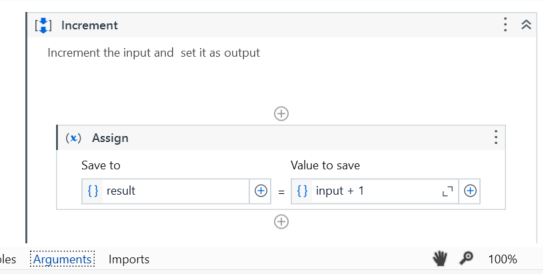
Increment, that adds one to any given result, thus incrementing the received value. - Creating another coded workflow (a CS file), named
IncrementProxy, that takes the randomly generated value from theRandomworkflow, invokes theIncrementXAML workflow on this value (using theworkflowsobject), and then returns the incremented result to the calling environment.
1. Create the Random coded workflow
- From the File group, create a new coded workflow.
- Change the
Execute()public class to accept twointtype input parameters namedminandmax, and return anint. The input parameters represent the boundaries within which a random value is generated, while the return parameter symbolizes the generated random value itself.
For example, change public void Execute() to public int Execute(int min, int max).
3. Create a new object of the Random class, using the new keyword and Random() constructor.
- Use the
Next()method from theRandomclass instance to generate a random number within the range betweenminandmax. - Assign this generated random number to a new variable, named
randomValue. - Return the
randomValuevariable. Returning this variable back to theExecutemethod allows you to access therandomValuevariable in any coded workflow inside your project that runs using theExecutemethod.
public class Random : CodedWorkflow
    {
        [Workflow]
        public int Execute(int min, int max)
        {
            // Get a random value between min and max
            var randomValue = new Random().Next(min, max);

            // Return it to the caller
            return randomValue;
        }
    }
2. Create the Increment low-code workflow
-
From the File group, create a new Workflow.
-
Create two arguments of type
Int32, namedresultandinput.. Set the direction of theresultargument as Out, and the direction of theinputargument as In. -
Add an Assign activity.
- In the Save to field, input the
resultvariable. - In the Value to save field, add the following expression, that increments the
inputvalue:input + 1.
- In the Save to field, input the
Create the IncrementProxy coded workflow
- From the File group, create a new coded workflow.
- Change the
Executeclass to take therandomvariable created at the Create theRandomcoded workflow step in this tutorial, and change the class to return anintargument. - Invoke the
Incrementlow-code workflow using theworkflowsobject, pass therandomInt32 variable to it, and store the output to a variable namedout_arg. - Log the
out_argvariable in the output panel. - Return the
out_argvariable back to theExecutemethod.
public class Workflow : CodedWorkflow
    {
        [Workflow]
        public int Execute(int random)
        {
            // Receive random from the XAML and increment it
            var out_arg  = workflows.Increment(random);

            // Log the result and return it to the caller
            Log(out_arg.ToString());

            // Return the result to the caller
            return out_arg;
        }
    }