Encryption
Overview
UiPath enforces encryption for data in transit and at rest across its cloud services. All inbound communications to UiPath services require TLS 1.2 or higher. Data at rest is encrypted using Transparent Data Encryption (TDE), which leverages AES 256-bit encryption.
Depending on the UiPath service and cloud platform, additional encryption mechanisms and key-management options may be available.
Application-Level Encryption (ALE)
For Test Cloud and Test Cloud Public Sector, in addition to TDE, some services support Application-Level Encryption (ALE):
- In some services, ALE is applied automatically (implicit ALE).
- In other services, ALE is optional and can be enabled by you (opt-in ALE).
- Some services do not currently support ALE.
When ALE is available and enabled, either implicitly or by opting in, you can choose how encryption keys are managed.
For services that support ALE, the following key-management options may be available:
-
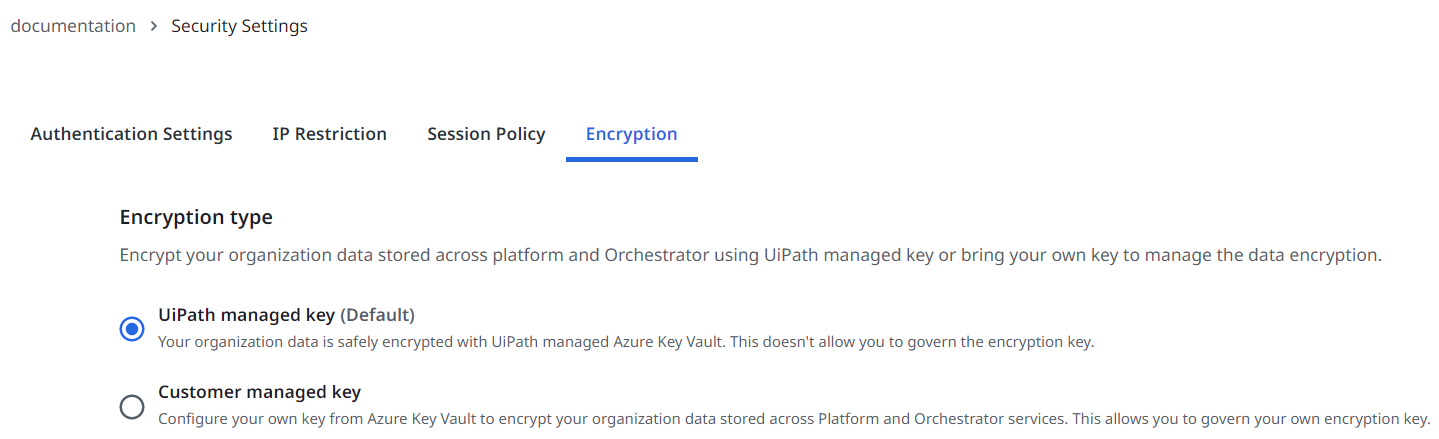
UiPath-managed key: This option allows UiPath to create, store, and protect the keys used for encrypting your data. This is the default option, and it is automatically enabled in the Encryption tab of your Admin section.
-
Customer-managed key: This option grants you full control and responsibility over the creation, storage, and protection of the encryption keys used for safeguarding your data. Unlike the UiPath-managed key, where UiPath manages these tasks by default, with a customer-managed key (CMK), you directly handle these aspects in your own secure environment.
tipUseful resources:
- Overview of CMKs: Understand and use Customer Managed Keys.
- Switching from customer-managed to UiPath-managed keys: Your guide for migrating from UiPath Key to CMK.
- Enabling a firewall for the customer-managed key: Learn to set up a firewall for CMKs.
Infrastructure-level encryption
For Test Cloud Dedicated, encryption at rest is applied at the infrastructure level. Encryption at rest is enabled by default for data stores such as SQL and Azure storage (Blob, disks, and files). Currently, UiPath manages the TDE protector as the default setting.
- UiPath-managed key: UiPath creates, stores, and protects the keys used for encrypting your data. This is the default option, and it is automatically enabled.
- Customer-managed key: Your encryption keys reside in your own Azure Key Vault, giving you full control over key creation, storage, rotation, and access permissions.
Key rotation and management
For Test Cloud Dedicated, you can use key rotation and management, because automatic key rotation is enabled by default where infrastructure-level encryption is used.
- Key auto-rotation occurs every 18 months.
- The rotation process decrypts and re-encrypts only the database encryption key.
- The system automatically updates the TDE protector with the latest key version available in Azure Key Vault within 24 hours.
This combination of automatic key updates and scheduled rotation provides an end-to-end, zero-touch key rotation mechanism for encryption at rest.
Encryption per service
The specifics of the encryption for each service or resource can be found in the following table.
For more information about ALE with Customer-Managed Keys, and guidance on how to set it up, visit ALE with CMK.
| Product |
Resource |
Encrypted resource fields |
Encryption applied |
|---|---|---|---|
| Action Center (Actions and Processes) |
Tasks | Data |
|
| AI Center ™ | Dataset, data labeling sessions, pipeline data, and artifacts | Database and storage |
|
| Agents | Traces | LLM input and output data within logs |
|
| Test Cloud | External applications | Customer access data |
|
| Test Cloud | Directory connections | Customer access data |
|
| Test Cloud | External identity providers | Customer access data |
|
| Automation Hub | Customer idea data | Database and storage |
|
| Automation Ops | API access keys Access Tokens |
Database and storage |
|
| Context Grounding | |||
| Data Fabric | Only for Text and Multi-line Text fields | Specific data output |
|
| Document Understanding | Document Manager sessions, document storage Note: FormsAI sessions are not available on CMK-enabled accounts. |
Database and storage |
|
| Insights | Dataset, reporting | Database and storage |
|
| Integration Service | Event data | Database and storage |
|
| IXP | All datasets | Database and storage |
|
| Marketplace | Database and storage |
|
|
| Maestro | Variables | All |
|
| Orchestrator | Queue Items | Specific Data Output |
|
| Orchestrator | Asset Values | Value |
|
| Orchestrator | Credential Stores | Orchestrator credential stores content |
|
| Orchestrator | Credential Stores | Non-Orchestrator credential stores access data |
|
| Orchestrator | Storage Buckets | Non-Orchestrator storage buckets access data |
|
| Process Mining | Database and storage |
|
|
| Task Mining | Recorded data (includes PII masking) | Database and storage |
|
| Test Manager | Credentials for third party integration Note: Credentials for integrations announced to be deprecated are not encrypted. |
Configuration |
|
| Test Manager | Attachments | Database and storage |
|
1 The customer or their account teams must submit a ticket to enable ALE. The UiPath engineering team manages these requests, so please allow a few days for processing. Once we've enabled ALE, you can configure in the Admin section whether or not to use CMK.