May 2026
May 28, 2026
Bug fixes
Fixed an issue where the Audit log was missing User login - Failure entries for users whose first login attempt was blocked by the organization's access restriction policy.
May 22, 2026
ScreenPlay tenant consumption enforcement
Organization and tenant administrators can now configure tenant consumption enforcement for ScreenPlay and Healing Agent. When the tenant's allocated amount is reached, this setting controls whether the product stops consuming units or continues drawing from the organization-level pool. The affected units are Platform Units and ScreenPlay Runs for ScreenPlay, and Agent Units and Heals for Healing Agent.
For details, see Tenant consumption enforcement and Configure tenant consumption enforcement.
May 21, 2026
PII masking extended to additional products
In-flight PII masking is now supported for conversational agents and Test Manager. You can enable masking per product from the AI Trust Layer policy in Automation Ops.
For details, refer to PII masking.
Data Fabric now available in Switzerland and United Arab Emirates
Data Fabric is now available in the Switzerland and United Arab Emirates regions. For details, see May 2026 in the Data Fabric release notes.
May 12, 2026
Relay
Relay is now available. Relay lets UiPath cloud services such as Integration Service and API Workflows securely reach on-premises HTTP and HTTPS endpoints inside your network — without a VPN, without opening inbound firewall ports, and without changing your network topology.
A lightweight Relay client runs inside your network and establishes an outbound-only TLS tunnel to Test Cloud. You register on-premises endpoints in UiPath Administration, and each endpoint receives a private Relay URL that cloud services use to route requests through the tunnel.
For details, see Relay.
May 8, 2026
Consumables tab behavior for disabled and deleted tenants
The **Configure allocation enforcement icon (gear icon) on the Consumables tab is now disabled for disabled and deleted tenants. In the Tenant Allocations section of the new unit consumption experience, you can now distinguish between disabled and deleted tenants: disabled tenants appear with their name, while deleted tenants appear with their tenant ID. Neither can be opened, so the Edit Allocation option is not reachable for them.
For more information, see Managing tenant unit allocation and Configure tenant consumption enforcement.
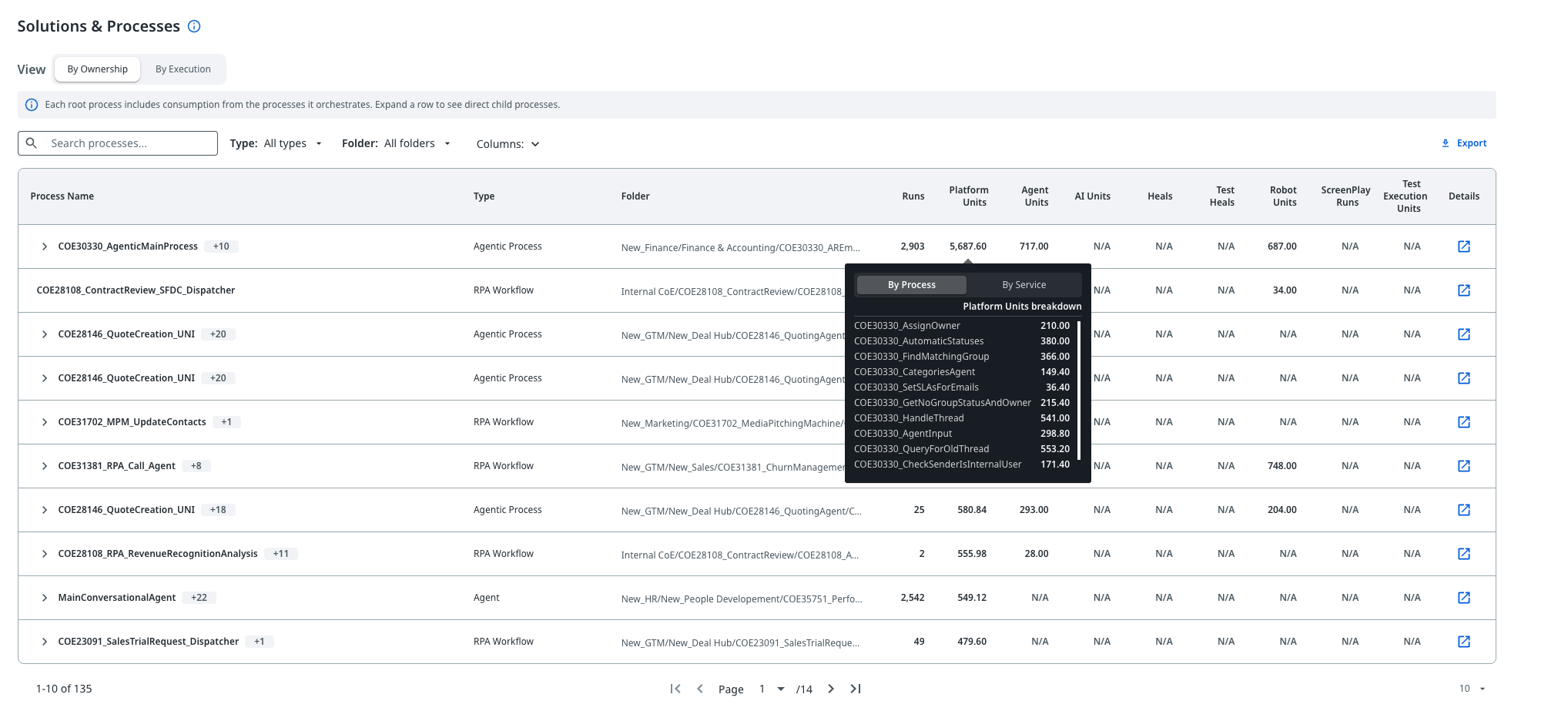
Service breakdown in the Solutions & Processes tooltip
Added May 29, 2026: This feature was released on May 8, 2026, but was not included in the release notes at the time.
The Solutions & Processes grid in the New Unit Consumption Experience now shows per-service consumption data for each process. You can select any process row to open the tooltip, then use the By Process / By Service toggle to switch views.
By Service shows how many units each service consumed for that process.

By Process shows units consumed broken down by each child process the root process orchestrated.
For more information, see Understanding the New Unit Consumption Experience.
May 6, 2026
Cached user tokens for group membership checks in Microsoft Entra ID integration
Organizations that integrate with Microsoft Entra ID using Delegated access can now allow UiPath to reuse cached user tokens to evaluate group membership in unattended automations and service-to-service (S2S) scenarios. Previously, the Delegated access scope did not support group membership resolution outside interactive sign-in with Microsoft Entra ID, which prevented Microsoft Entra ID directory users from inheriting group-based permissions in these scenarios.
Enable the new Use cached user tokens for group membership checks in unattended automations option from Admin > Security > Authentication Settings > Directory integration and single sign-on (SSO) in your Microsoft Entra ID configuration. New directory connections have the option enabled by default; existing directory connections must opt in.
The availability of this feature depends on the cloud platform that you are using. For details, refer to the Feature availability page, specifically the Use cached user tokens for group membership checks row.
For more information, check Use cached user tokens for group membership checks.
May 5, 2026
New Platform Management API endpoints: Directory and group members
The following new endpoints are now available in the Platform Management API.
Directory API — search and resolve directory entities (users, groups, or applications) within your organization:
- Search Directory
- Resolve Directory Entity
- Resolve Directory Entity by Name
- Bulk Resolve Directory Entities
- Bulk Resolve Directory Entities by Name
Groups API — retrieve the members of a specific local group:
For a full overview of available endpoints, see Directory and Groups.