External Applications (OAuth)
As a developer working on the integration of UiPath products with external applications, you are responsible for tasks such as managing scope changes, managing access tokens and refresh tokens and maintaining the integration between the external app and UiPath resources. The following guide walks you through these operations.
OAuth offers a selection of libraries that you can leverage to simplify authentication, authorization, delegation and securing API calls. You can access these resources directly from the official OAuth website.
Prerequisites
As a developer, once the organization admin has registered your external application in UiPath, you will need to obtain the registration details to authenticate your external app with UiPath resources.
- The App Type and the App ID. If you are working with a confidential application, you will also need the App Secret. These are used to authenticate your app with UiPath's Identity Server, the authorization server for accessing UiPath resources, which supports the OAuth 2.0 framework.
- Additionally, you need to know the external app scopes, which defines what resources your external app can access in UiPath. This includes both the resource specification (like Assets, Processes, etc.) and the permission level (read, write, edit, etc.).
Authenticating and authorizing external apps
After the external application is registered, you must implement the appropriate authorization mechanism for the external application, with the appropriate grant type, so that the external application can retrieve an access token.
During this process, request an access token by providing the scope of the external app and the credentials of the registered app - the App ID (and App Secret in the case of confidential applications) - to Identity Server. If the credentials are valid, Identity Server responds by issuing an authorization code, which will be used to generate the access token.
Which authorization grant type to use
| Application Type | Scope | Required Grant Type |
|---|---|---|
| confidential | application | Client credentials |
| confidential | user | Authorization code |
| confidential | application & user | Client credentials & Authorization code |
| non-confidential | user | Authorization code with PKCE |
When the scope name is the same under both user and application scope, as in the case of Orchestrator, the grant type you use determines if the resource is called under user scope or under application scope.
Declaring scopes
The scope defined by the administrator for an application determines the maximum level of access that the application can attain. As a developer, if you request access beyond this predefined scope, your request fails. Therefore, it is important to ensure your requests are within the scope defined by the admin.
At the admin level, application's permissions can be:
- Organization-scoped permissions: By default, when an external application is registered, it has organization-wide access to the resources according to the scopes set.
- Fine-grained permissions: For more granular permission settings, the organization admin can assign a role at the tenant or folder level within Orchestrator to the external app, though this is only applicable for confidential applications.
At the developer level, declaring scopes is done as follows:
- Organization-scoped permissions: When you declare an explicitly specified scope like
OR.Machines.Viewin the token request, it implies that the application is requesting an organization-wide access permission. - Fine-grained permissions: To provide your application with fine-grained access, you must declare
OR.Defaultin the token request.OR.Defaultacts like a wildcard scope, providing your application with fine-grained access that depends on its assigned role in specific tenants or folders.
For example, suppose you want your application to have organization-wide access to view all machines, as well as exclusive permissions at a more granular level within defined tenants and folders. In that case, you can declare the scopes as OR.Machines.View and OR.Default. This combined declaration allows your external application to operate both at an organization-wide level and specific Orchestrator tenants or folders.
Check the endpoint in the API documentation of the resource to get the scope values you need. For example:

Confidential apps with user scopes (authorization code flow)
For a confidential external apps with user scopes, you perform the authorization code flow against Identity Server.
Diagram shows the OAuth Authorization Code flow. Client requests authorization from Identity Server. User is then prompted to log in. Upon success, Identity Server provides authorization code. Client uses this code and client secret to retrieve an access token. With the verified token, access to API resources is provided.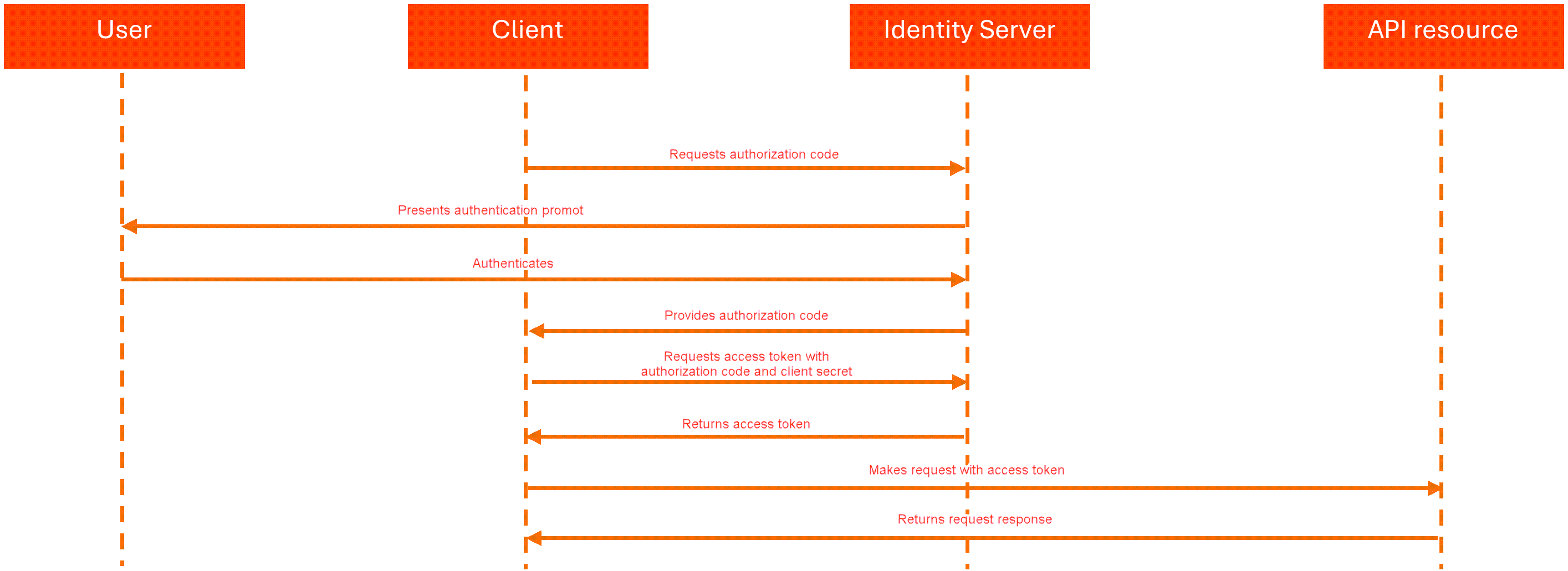
For a detailed understanding of the OAuth flow utilizing authorization codes, please refer to the RFC 6749 document.
If you are using Postman or a similar tool, use the content type application/x-www-form-urlencoded
- The external application sends an authorize request to get the authorization code to the Identity Server authorize endpoint
https://{yourDomain}/{organizationName}/identity_/connect/authorize?:response_type=code&acr_values={value}&client_id={app_id}&scope={scopes}&redirect_uri={redirect_url}
| Option |
Description |
|
|
Allows Identity Server to apply an authentication policy based on the organization to which the user belongs. Can take different values:
|
|
|
Specifies the unique identifier assigned to the application during its registration. Must contain the App ID (as provided by the administrator). |
|
|
Specifies a confidential piece of information, like a password, that is provided to confidential applications upon their registration. This field is used along with the client_id to authenticate the application when it issues requests to the Identity Server. Must contain the App Secret (as provided by the administrator). |
|
|
Specifies the scopes requested by the application, delimited by a space; for example: OR.Machines.View OR.Default .
|
|
|
Specifies the URL where Identity Server redirects the authorize request after the authorization code is granted |
The request fails if:
- the user is not in the organization where the external application was registered
- for some resources, the logged in user does not have the required permissions for the scope of the request.
-
The external application receives the authorization code. You can use the authorization code only once.
Sample authorize request redirect:
{redirect_url}?code={authorization_code}&scope={scopes} -
The external application requests an access token from UiPath® Identity Server using the authorization code and authentication details (
client_idandclient_secret). These are included in the body of a POST request to the token endpointhttps://{yourDomain}/{organizationName}/identity_/connect/token.grant_type=authorization_code&code={authorization_code}&redirect_uri={redirect_url}&client_id={app_id}&client_secret={app_secret} -
The external application receives a response containing the access token, for example:
{
    "access_token":"{access_token}",
    "expires_in":3600,
    "token_type":"Bearer",
    "scope":"{scopes}"
}
The application can use the access token to access user resources until the token expires (one hour).
Non-confidential apps with user scopes (authorization code with PKCE flow)
For a non-confidential application with user scopes, you perform the authorization code with PKCE flow. For a detailed understanding of the OAuth flow utilizing authorization code with PKCE, please refer to the RFC 7636 document.
With this grant type, the flow is as follows:
-
The external application sends an authorize request to get the authorization code to the
https://{yourDomain}/{organizationName}/identity_/connect/authorize?endpoint:response_type=code&client_id={app_id}&scope={scopes}&redirect_uri={redirect_url}&code_challenge={cryptographically-random string from code_verifier}&code_challenge_method=S256Option Description client_idSpecifies the unique identifier assigned to the application during its registration. Must contain the App ID (as provided by the administrator). scopeSpecifies the scopes requested by the application, delimited by a space; for example: OR.Machines.View.redirect_uriSpecifies the URL where UiPath Identity Server redirects the authorize request after the authorization code is granted. code_challenge_methodSpecifies the method used to encode the code_verifierfor thecode_challenge. The value for this field must be S256, meaning thecode_verifiershould be hashed using SHA256 and base64url-encoded to create thecode_challenge.code_challengeA cryptographically-random string derived from the code_verifier, used to connect the authorization request to the token request. You must use a code verifier algorithm to generate the code challenge. You can also create your own, as long as it complies with the rfc7636 standard. -
In the POST token request to
https://{identity_baseURL}/connect/token, you need to includecode_verifier(the original string used to generatecode_challenge) in the request body.grant_type=authorization_code&code={authorization_code}&redirect_uri={redirect_url}&client_id={app_id}&code_verifier={code_verifier}
The response includes an access token which the application can use to access user resources until the token expires (one hour).
Confidential apps with app scopes (client credentials flow)
Confidential applications with application scopes perform the client credentials flow against the UiPath Identity Server.
Diagram shows OAuth client credentials flow. Client sends credential to Identity Server and receives access token. With verified token, access is provided to API resources.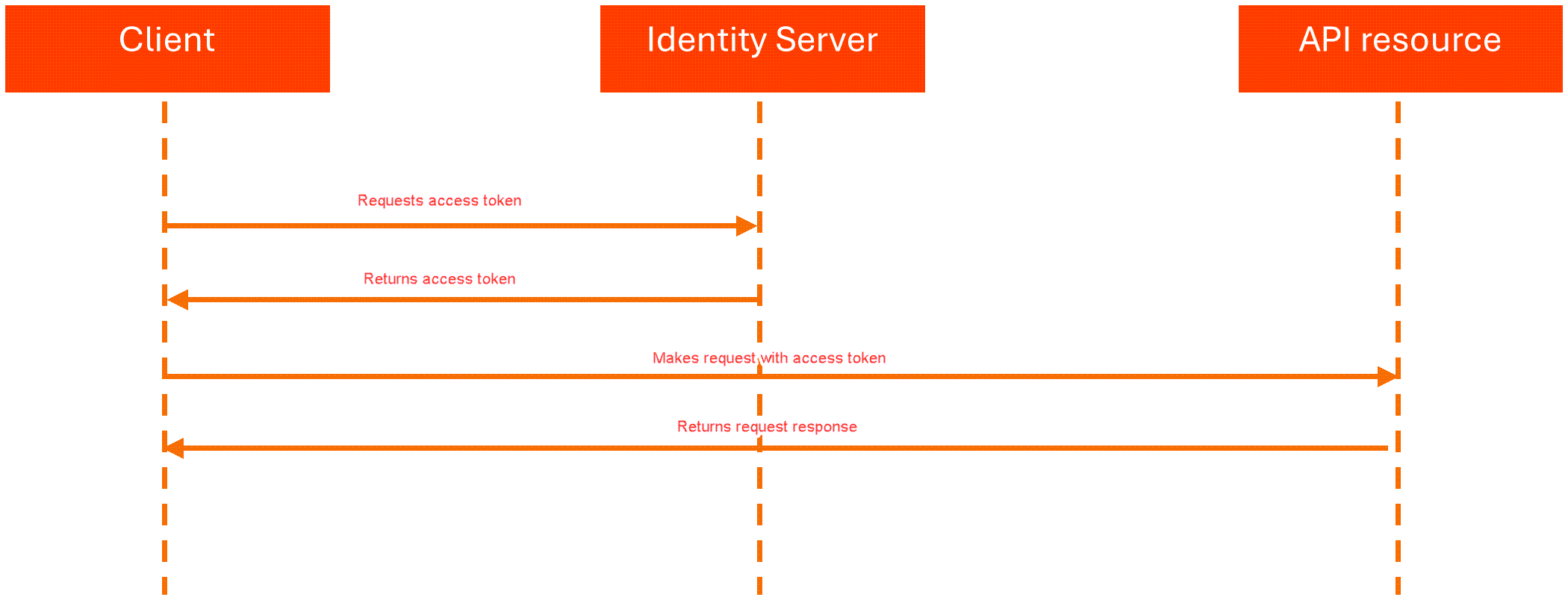
For a detailed understanding of the OAuth flow utilizing Client Credentials, please refer to the RFC 6749 document.
With this grant type, the flow is as follows:
- The external application requests an access token by sending a POST request that includes the
client_idandclient_secretto the Identity Server token endpoint:https://{yourDomain}/{organizationName}/identity_/connect/token:grant_type=client_credentials&client_id={app_id}&client_secret={app_secret}&scope={scopes}
| Field |
Description |
|
|
Specifies the unique identifier assigned to the application during its registration. Must contain the App ID (provided by the administrator). |
|
|
Specifies confidential piece of information, like a password, that is provided to confidential applications upon their registration. This field is used along with the client_id to authenticate the application when it issues requests to the Identity Server. Must contain the App Secret (provided by the administrator). |
|
|
Specifies the scopes requested by the application, delimited by a space; for example: OR.Machines.View OR.Default .
|
The application can use the access token to access user resources until the token expires (one hour).
Using the access token
After the application has an access token, it can use the token to access allowed resources, limited to the selected scopes, until the token expires (one hour).
Here is a sample request to the odata/Machines API that uses an access token in the Authorization header, where the access token contains OR.Machines scope in the scope claim.
curl -X GET "https://{yourDomain}/{organizationName}/{tenantName}/orchestrator_/odata/Machines"
  -H "Authorization: Bearer {access_token}" -H  "accept: application/json"
Obtaining a refresh token
Access tokens expire in one hour. The external application can get a new access token without user interaction by exchanging a refresh token for it. Both confidential and non-confidential external applications using the authorization code flow can request a refresh token.
The client credentials flow does not support refresh tokens. In that flow, access tokens are issued directly without refresh tokens. When a new access token is required, the client must request a new token using its credentials.
To request a refresh token, you must include offline_access in the scope parameter of the authorize request so that the authorization code can be used in a token request to get a refresh token.
Refresh token behavior
- Refresh tokens have an absolute expiration time of 60 days.
- Refresh tokens are reusable during their validity period of 60 days.
- The same
refresh_tokenvalue is returned when exchanging it for a new access token. - Using a refresh token does not invalidate it.
- After 60 days, the refresh token expires and the user must reauthenticate to obtain a new authorization code.
Getting a refresh token
Send a POST request with the authorization code to the token endpoint
https://{yourDomain}/{organizationName}/identity_/connect/token.
If you are using Postman or a similar tool, use the content type application/x-www-form-urlencoded.
The request returns a new access token and a refresh token:
{
    "access_token": "{access_token}",
    "expires_in": 3600,
    "token_type": "Bearer",
    "refresh_token": "{refresh_token}",
    "scope": "OR.Machines OR.Robots offline_access"
}
Getting a new refresh token and a new access token
Send a POST request to the token endpoint https://{yourDomain}/{organizationName}/identity_/connect/token using the refresh_token grant type.
If you are using Postman or a similar tool, use the content type application/x-www-form-urlencoded.
{
    "grant_type": "refresh_token",
    "client_id": "{app_id}",
    "client_secret": "{app_secret}",
    "refresh_token": "{existing_refresh_token}"
}
If the external application is non-confidential and utilizing the authorization code with the PKCE grant type, remove the client_secret parameter from the request body.
The response returns a new access token and a new refresh token.
The refresh_token returned in the response remains the same as the one provided in the request and remains valid until its 60-day expiration.
UiPath® Identity Server endpoints
If you are using Postman or a similar tool, use the content type application/x-www-form-urlencoded for any requests to Identity Server endpoints. If you are making requests programmatically, this is not required.
| Identity Server layer | Endpoint | Description |
|---|---|---|
| Discovery | https://{yourDomain}/{organizationName}/identity_/.well-known/openid-configuration | Use this endpoint to retrieve metadata about your Identity Server instance. |
| Authorization | https://{yourDomain}/{organizationName}/identity_/connect/authorize | Use this endpoint to request tokens or authorization codes via the browser. This process includes authentication of the end-user and optionally consent. |
| Token | https://{yourDomain}/{organizationName}/identity_/connect/token | Use this endpoint to programmatically request tokens. Note that for this endpoint, the content type must be application/x-www-form-urlencoded. |